
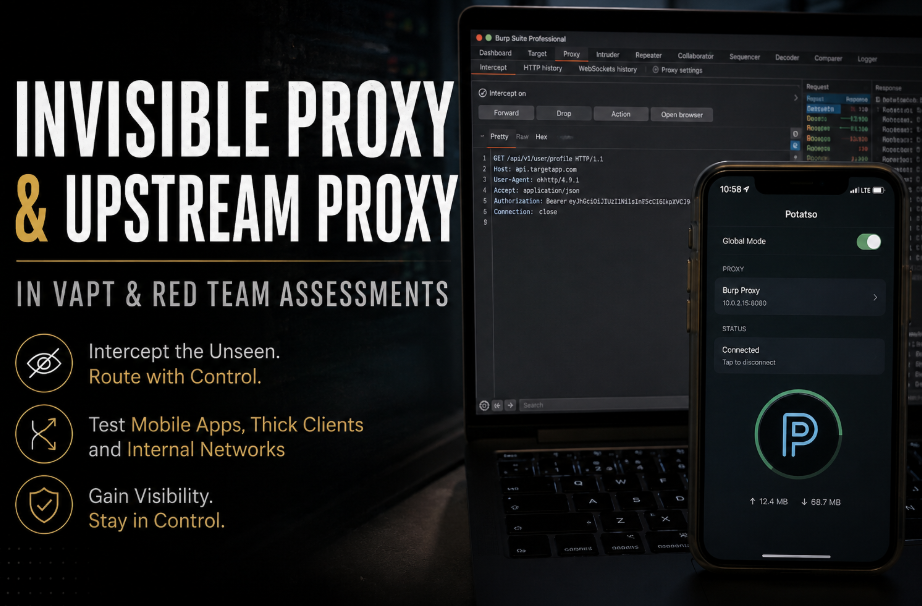
Proxy servers are a fundamental component of modern security assessments. Most security professionals are familiar with configuring their browser to route traffic through Burp Suite and intercept HTTP requests. However, not every application supports proxy configurations, and not every target is directly accessible from a tester’s workstation. This is where advanced proxy configurations become valuable.
Two of the most useful but often overlooked proxy modes available in Burp Suite are Invisible Proxy and Upstream Proxy. These configurations enable testers to intercept traffic from applications that do not support proxies, route traffic through jump hosts, access internal applications, and perform assessments in segmented network environments.
This article explores how Invisible Proxy and Upstream Proxy work, when they should be used, and practical scenarios where they can significantly improve testing capabilities during VAPT and Red Team engagements.
What is an Invisible Proxy?
An Invisible Proxy allows Burp Suite to intercept requests from applications that are not configured to use a proxy. In a traditional setup, the client is aware that a proxy exists. With an Invisible Proxy, the application believes it is communicating directly with the target server. Burp accepts requests that are not formatted as proxy requests and reconstructs the original destination before forwarding them. This makes Invisible Proxy particularly useful when testing applications that do not support manual proxy configuration.
Why Do We Need Invisible Proxy?
Many modern applications do not respect system proxy settings. Examples include:
- Mobile applications
- Thick client applications
- Java applications
- Embedded devices
- IoT devices
In these situations, configuring Burp as a standard proxy may not work always. Instead, traffic can be redirected to Burp through:
- Hosts file modifications
- DNS overrides
- Network Address Translation (NAT)
- Port forwarding
Once redirected, Burp can intercept the traffic using Invisible Proxy mode.
Invisible Proxy During Mobile Application Testing
Mobile application assessments frequently encounter applications that:
- Ignore device proxy settings
- Use custom networking libraries
- Implement non-standard communication methods
One common challenge during iOS or Android application assessments is that applications do not always respect the device’s configured proxy settings. While testers often rely on Wi-Fi proxy configurations to route traffic through Burp Suite, some applications may implement custom networking stacks or behave differently when proxy settings are detected
A common approach is:
- Redirect DNS resolution.
- Point the API hostname to the Burp listener.
- Enable Invisible Proxy mode.
- Install Burp certificates if required.
The mobile application remains unaware that traffic is being intercepted. In such instances, One of the most common tool that people use now days is Potatso during iOS application pentesting. Potatso is a network traffic routing application for iOS that can redirect device traffic through user-defined proxy servers. Instead of requiring every application to individually support proxy settings, Potatso creates a local VPN profile on the device and transparently forwards traffic according to configured routing rules.
Although the application may not be explicitly configured to use a proxy, Potatso intercepts and redirects the traffic at the operating system level, allowing Burp Suite to inspect requests and responses. This concept closely aligns with how Invisible Proxy deployments are often used during mobile application assessments. The application itself remains unaware that traffic is being redirected, while the tester gains full visibility into the communication between the application and backend services.
Demonstration of Invisible Proxy Using Potatso
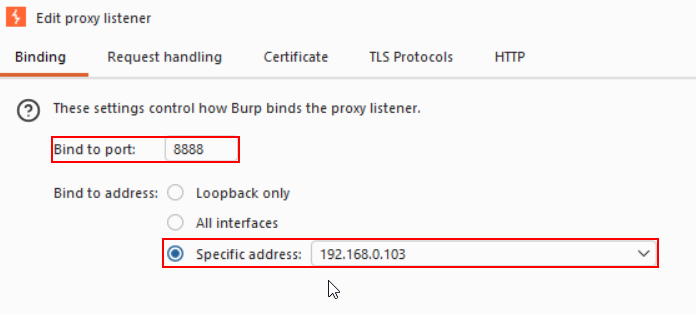
Step 1: Configure listener on Burp and setup a port to listen. In this case we have chosen port “8888”
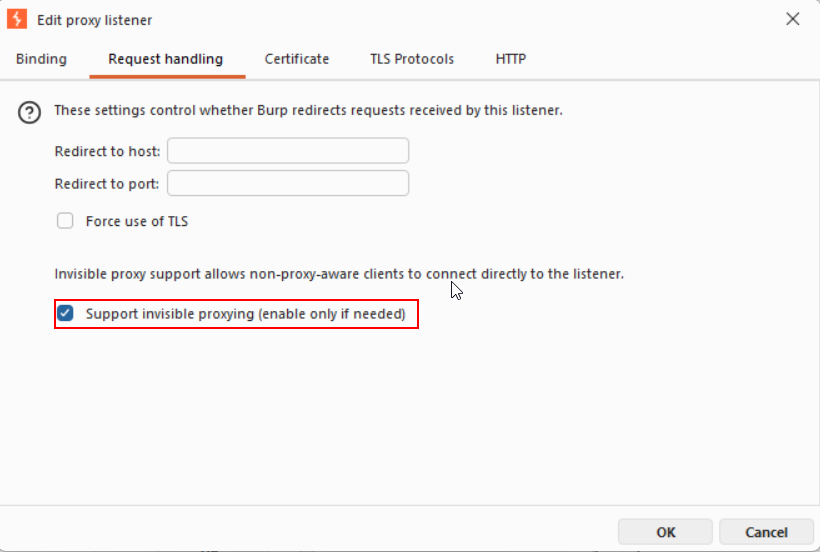
Step 2: Ensure “Support Invisible Proxying” is enabled in “Request handling” tab as displayed.
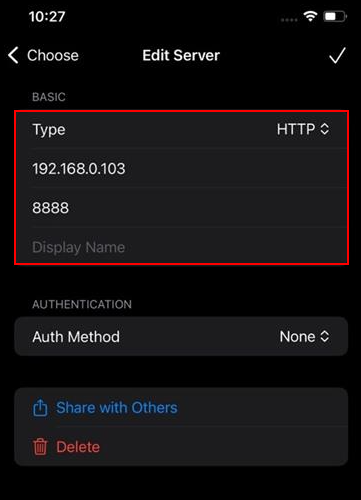
Step 3: Use Potatso and setup connection to the server in order to create invisible proxy.
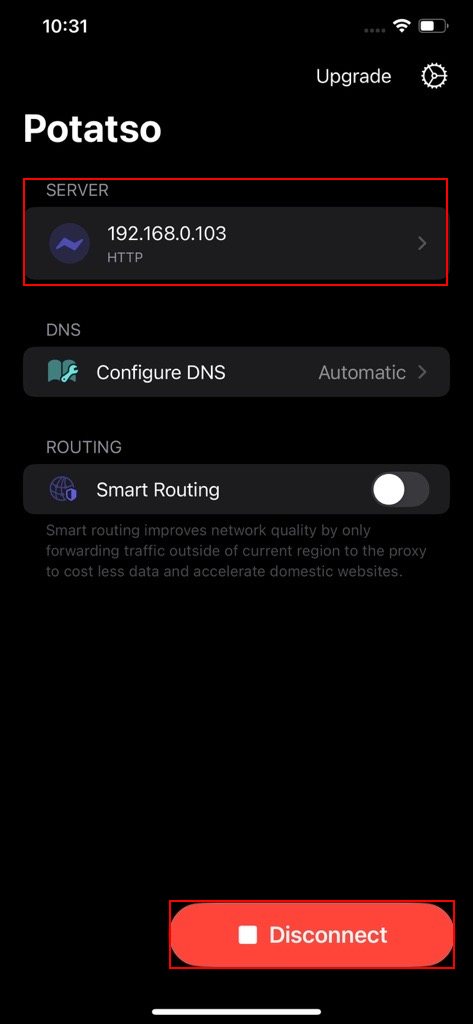
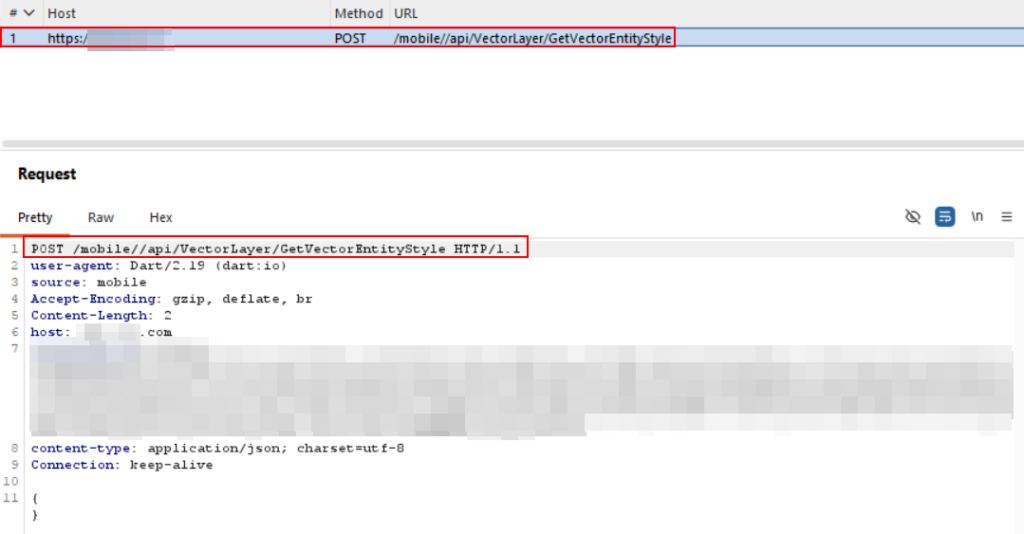
Step 4: Configure burp certificate in the mobile device and start intercepting the request of applications without any issues as demonstrated.
Common Invisible Proxy Use Cases in VAPT
- Mobile Application Testing: Useful when applications ignore Android or iOS proxy configurations.
- Legacy Application Assessments: Many older desktop applications were never designed with proxy support.
- Embedded Device Testing: IoT devices often communicate directly with cloud services and require traffic redirection techniques.
- Internal Application Testing: Applications communicating over fixed IP addresses can be redirected through Burp for analysis.
What is an Upstream Proxy?
An Upstream Proxy allows Burp Suite to forward requests through another proxy before reaching the target application. This effectively creates a proxy chain. The upstream component can be:
- Another Burp instance
- Corporate proxy
- Jump server
- SOCKS proxy
- Remote testing system
Why Use an Upstream Proxy?
In real-world assessments, targets are not always directly reachable. Examples include:
- Internal applications
- Segmented environments
- Cloud private endpoints
- VPN-only applications
- Red Team pivot scenarios
An Upstream Proxy enables traffic routing through systems that have access to the destination.
Upstream Proxy During Internal Network Assessments
A common scenario involves an internal application accessible only from a jump host. The tester’s workstation cannot communicate directly with the application. Burp forwards all traffic through the jump host, allowing normal testing activities while maintaining visibility into requests and responses.
Upstream Proxy During Red Team Operations
During Red Team engagements, testers often discover internal applications, APIs, dashboards, and management interfaces that are not directly reachable from their attacking workstation. Access may only be available from a compromised host, jump server, VPN gateway, or cloud bastion system. Instead of running testing tools directly on these intermediary systems, Burp Suite can be configured to use an Upstream Proxy, allowing all traffic to be routed through the accessible host while maintaining interception, logging, and modification capabilities on the attacker’s machine.
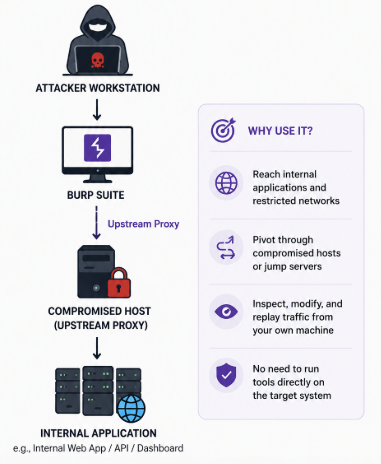
This approach provides a centralized location for testing, reduces operational complexity, and enables security professionals to inspect requests and responses for internal applications that would otherwise remain inaccessible. Upstream Proxies are particularly useful during network pivoting scenarios where a foothold has been established inside a segmented environment and deeper access is required to reach internal services.
Demonstration of Upstream Proxy
Step 1: Two Systems are required for this setup. Lets assume First is Client Provided Hardened System with just Burp Configured and Second is Attacker System.
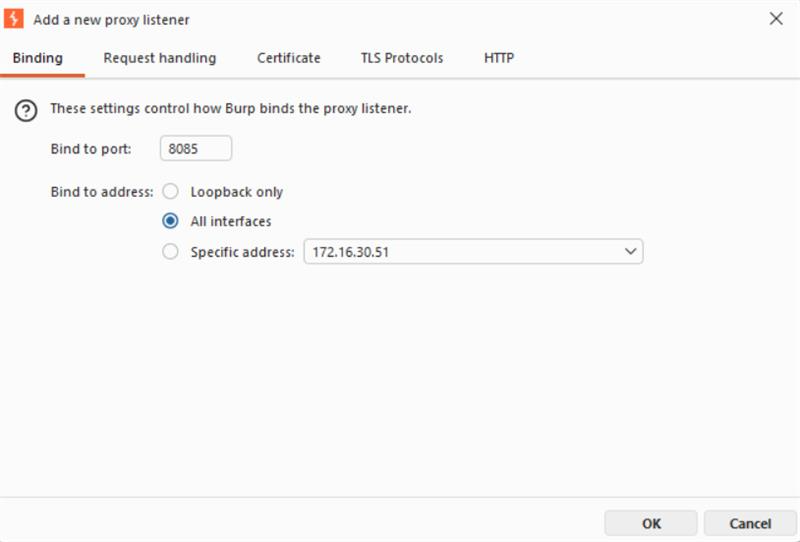
Step 2: Check your system IP depending on the network connected, you will be assigned an IP. You can check IPv4 Address (Example: 192.168..). Setup a Listener with Binding address as “All Interfaces” and Binding port of your choice. In this case we have used port 8085 for demonstration purpose.
Step 3: Go to Attacker System and traverse to Settings.
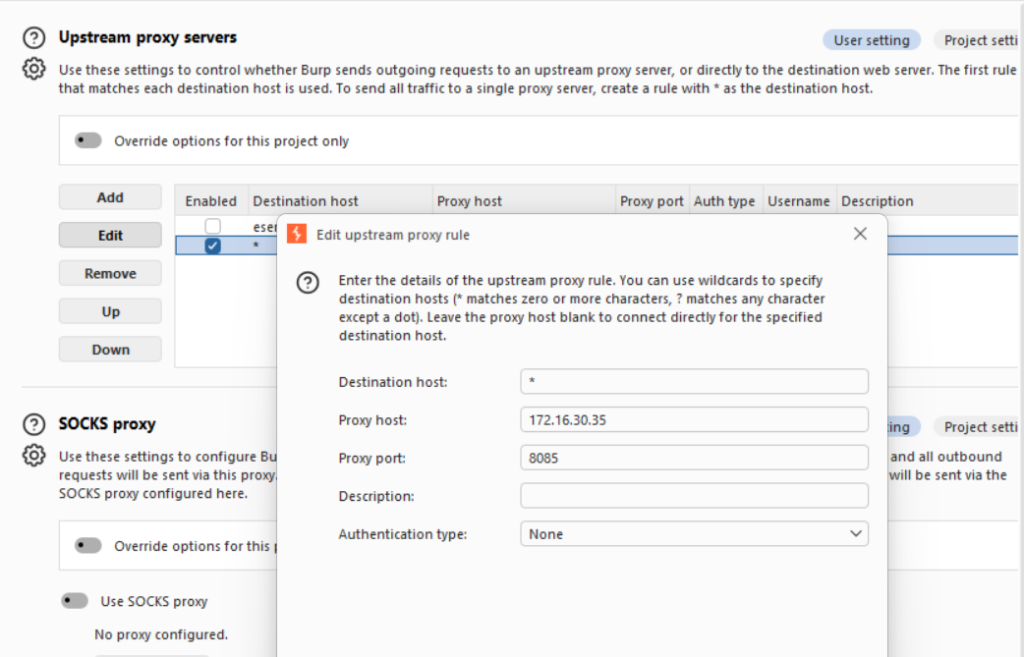
Settings->Upstream Proxy-> Network-> Connections-> Upstream Proxy Servers
Step 4: Add Upstream Proxy Entry. Destination Host can be left empty or can put “*” also. Proxy Host IP should be Client Provided Hardened System.
Step 5. Enter proxy port as the port setup in Client Provided Hardened System in this case “8085” port.
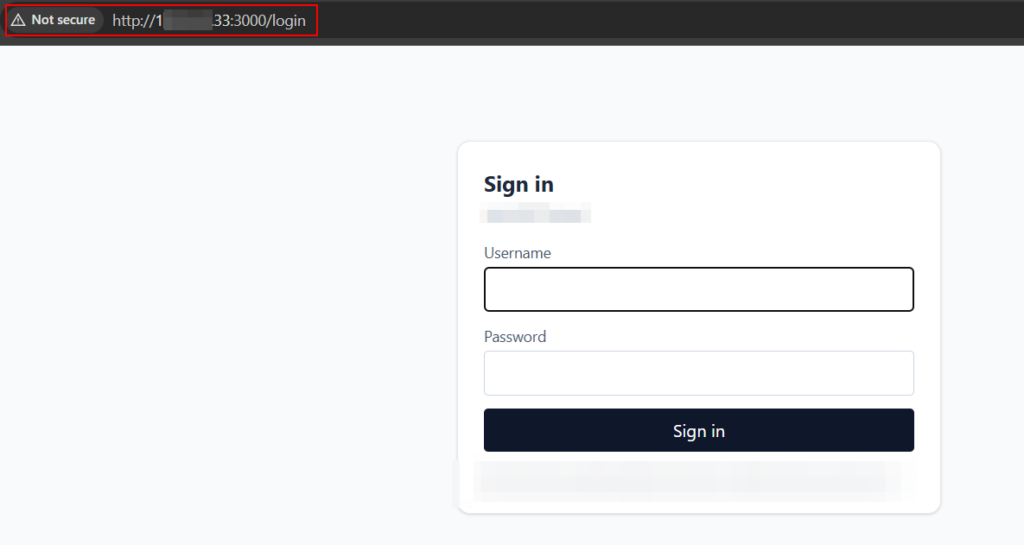
Step 6: Use burp in built browser and access Internal Applications from Client Provided Hardened System. You should be able to access it in Attacker System.
This concept comes in real handy when we aren’t allowed to configure additional tools in the system, we don’t have burp professional or extensions provided in the client systems etc during internal Pentesting activity or activities carried out over VPN connection etc.
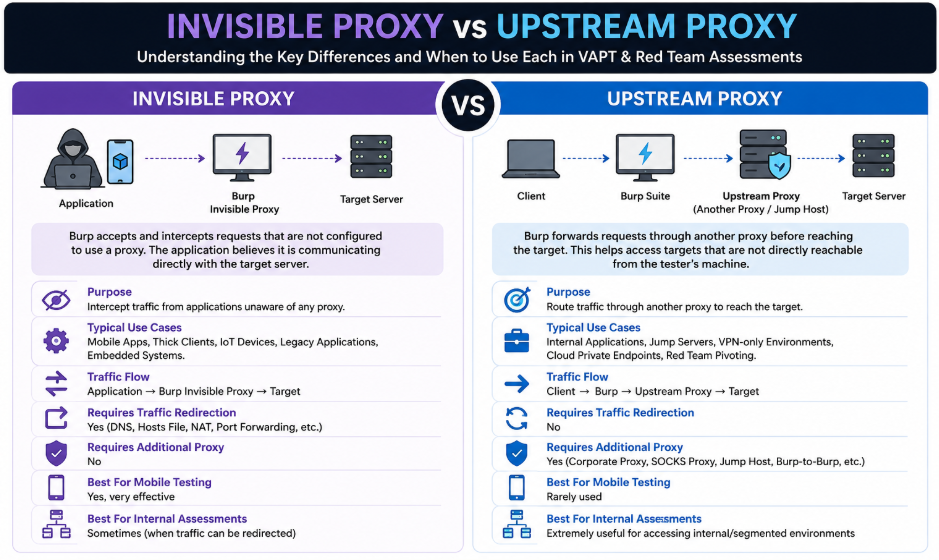
Invisible Proxy and Upstream Proxy address two distinct challenges frequently encountered during VAPT and Red Team engagements. Invisible Proxy enables testers to intercept traffic from applications that are unaware of proxy configurations, making it particularly valuable during mobile application, thick client, and embedded device assessments. Upstream Proxy, on the other hand, focuses on reachability by allowing traffic to be routed through jump hosts, pivot points, bastion systems, or other intermediary proxies to access internal and otherwise unreachable resources while maintaining full visibility within Burp Suite.
Understanding when and how to leverage these proxy configurations can significantly improve testing efficiency and help overcome common obstacles encountered in modern assessment environments. Whether intercepting traffic from a mobile application using traffic redirection techniques or routing requests through a compromised host during a Red Team operation, these proxy modes provide flexibility that extends far beyond traditional browser-based testing.
It is also important to note that Invisible Proxy and Upstream Proxy represent only a small subset of the proxy configurations available to security professionals. Other commonly used proxy types include Forward Proxy, Reverse Proxy, Transparent Proxy, SOCKS Proxy, Chained Proxies, Intercepting Proxies, TLS Termination Proxies, and several specialized proxy architectures used in enterprise environments and advanced offensive security operations. Each serves a unique purpose and can be invaluable depending on the assessment objectives and network architecture involved.
In a future blog, we will explore these additional proxy configurations in detail, discussing how they work, where they fit within VAPT and Red Team engagements, and practical scenarios where they can be used to improve visibility, pivoting capabilities, traffic analysis, and overall assessment effectiveness. In next blog, we will cover how other web application testing tools can be used with the upstream proxy to test the applications.