
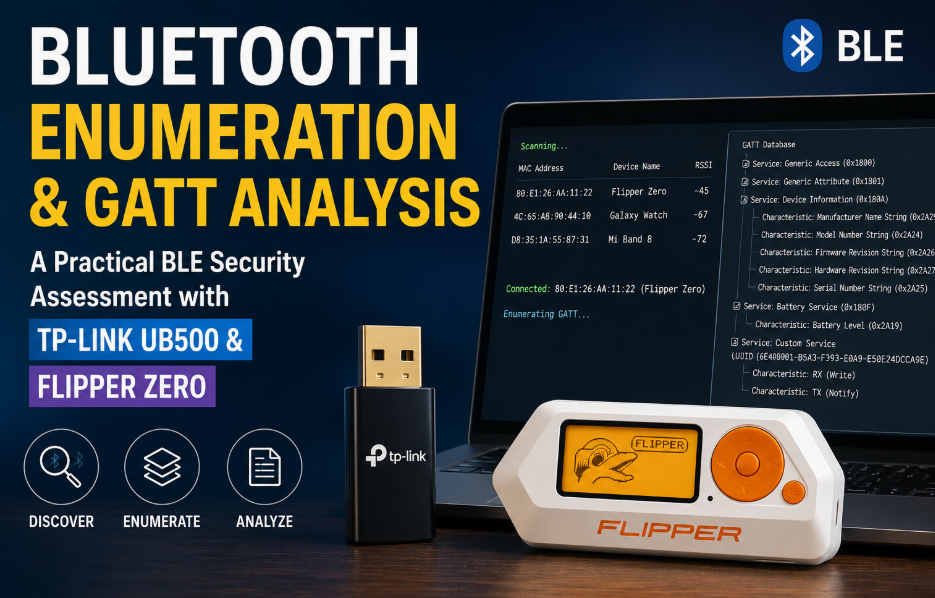
After successfully building a Bluetooth pentesting lab, the next logical step is learning how to enumerate Bluetooth Low Energy (BLE) devices. Enumeration is one of the most important phases of any BLE security assessment because it reveals how a device communicates before attempting any form of security testing.
Incase you missed the previous blog covering the setup. Referencing the same here for your reference.
Unlike traditional network services where tools such as Nmap identify open ports and running services, BLE devices expose their functionality through advertising packets, services, characteristics, and descriptors. These collectively describe everything from battery status and firmware information to sensor data and device configuration.
In this article, we’ll perform a practical BLE enumeration using a TP-Link UB500 Bluetooth adapter and a Flipper Zero acting as the target BLE device. Throughout the assessment, we’ll use Linux-based tools to identify nearby devices, inspect their advertisements, enumerate their GATT database, and understand what information can be gathered without exploiting the target.
This guide focuses entirely on enumeration and analysis. No attacks or exploitation techniques are covered here, making it an ideal continuation of the Bluetooth Lab Setup Guide.
Understanding BLE Enumeration Workflow
Before diving into commands, it’s helpful to understand the overall workflow followed during a BLE assessment.
- Detect nearby BLE devices.
- Identify the target device.
- Collect advertisement information.
- Connect to the target.
- Enumerate GATT services.
- Enumerate characteristics.
- Read publicly accessible values.
- Document findings.
This methodology is followed by most BLE security tools regardless of the platform.
LAB Setup
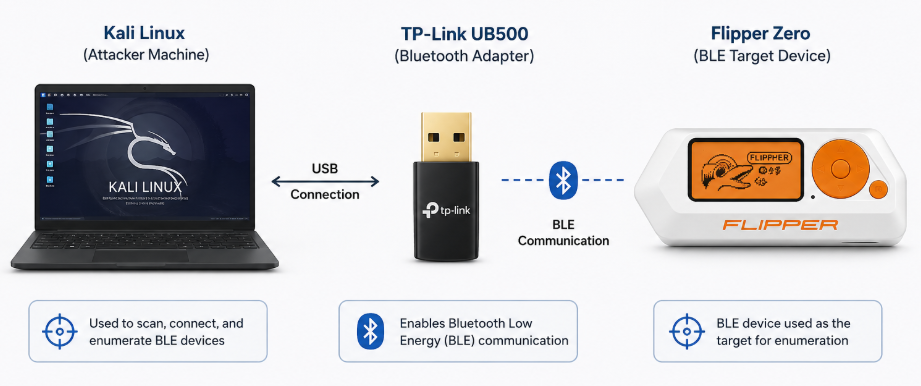
The Flipper Zero is configured to advertise Bluetooth services while the TP-Link UB500 passively discovers and connects to it.
Step 1: Verify Bluetooth Adapter
First, verify that Linux detects the Bluetooth adapter.
hciconfigYou can also use the newer management utility.
btmgmt info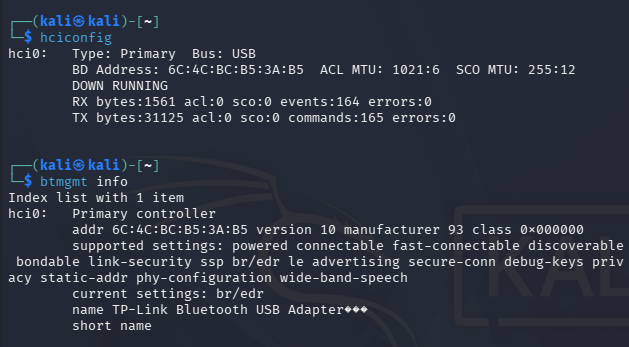
Modern Linux distributions recommend using bluetoothctl and btmgmt because older utilities such as hcitool are deprecated in newer BlueZ releases.
Step 2: Scan Nearby BLE Devices
Launch Bluetooth CLI:
bluetoothctlEnable scanning:
scan on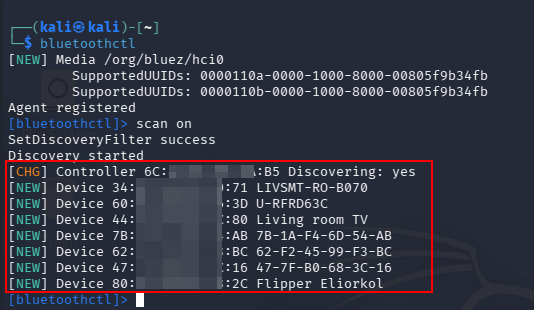
At this stage you should observe that details like MAC Address and Device Names can be obtained using bluetoothctl.
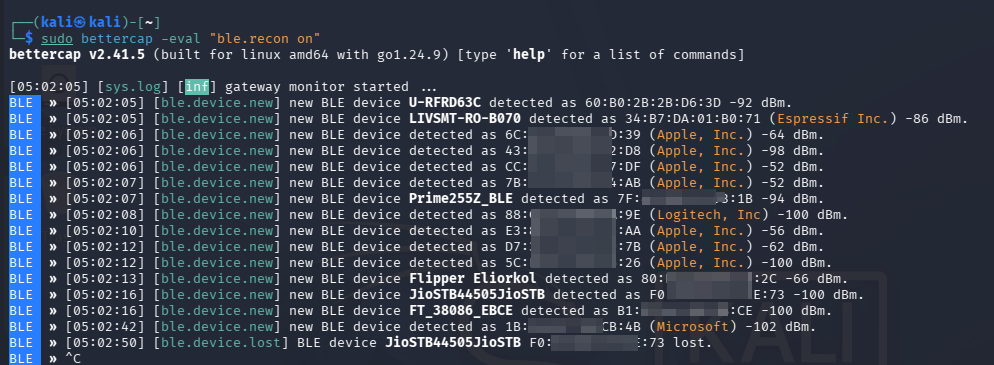
We can also use bettercap to enumeration and obtain additional details apart from MAC Address and Device Name like Signal Strength and Advertisement frequency. As an example from the obtained output we can figure out that the Device Name is Flipper Eliorkol, MAC ID can be obtained besides the device name, Manufacture Name can be obtained like in our case Logitech, Apple, Microsoft etc and Signal Strength can be obtained like -52 dBm.
These values help identify the intended target. BLE devices periodically broadcast small packets called advertisements. These packets allow nearby devices to discover them without first establishing a connection. An advertisement may contain:
- Device Name
- Service UUIDs
- Manufacturer Data
- Flags
- Appearance
- TX Power
- Device Capabilities
Not every field is mandatory. Many devices expose only minimal information, while others reveal significantly more. For an attacker, advertisement packets provide an initial fingerprint of the target.
Step 3: Connect to the Device
After identifying the Flipper Zero, connect using its MAC address.
connect 80:E1:26:AA:11:22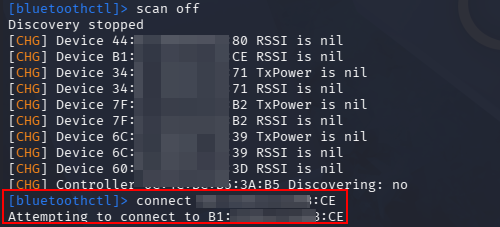
Once connected, Linux can request the target’s GATT database. The Generic Attribute Profile (GATT) defines how BLE devices organize and expose data. Think of GATT as a filesystem.
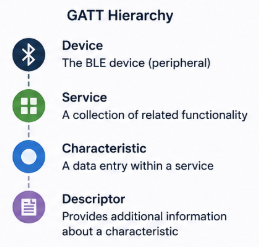
Services group related functionality. Characteristics contain the actual data. Descriptors describe how characteristics behave. Everything visible during enumeration belongs somewhere inside this hierarchy. To demonstrate this we can connect to a device of our choice and attempt to enumerate details though bluetoothctl.
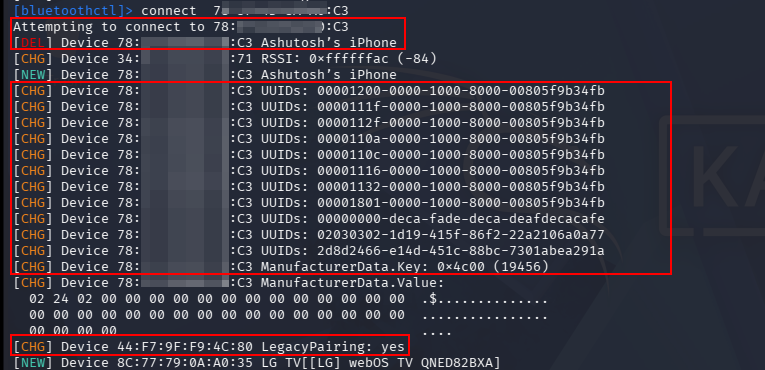
The output shows the Device Name and MAC Address however we are able to make a connection attempt and obtain additional information. We get to know that Manufacturer is “Apple Inc.”, GATT support of “UUID 0x1801” was detected. Obtained UUID have their own significance and importance here like “UUID 1112” is “Headset Profile”, “UUID 1132” is “Message Access Profile (MAP)” etc. We also obtained information that Legacy Pairing is supported in the device.
GATT Enumeration Demonstration Using Flipper Zero
Step 1: Start a BLE Peripheral on Flipper Zero
On the Flipper, navigate to Bluetooth Remote or any application that advertises as a BLE peripheral. You’ll notice the Flipper starts advertising.
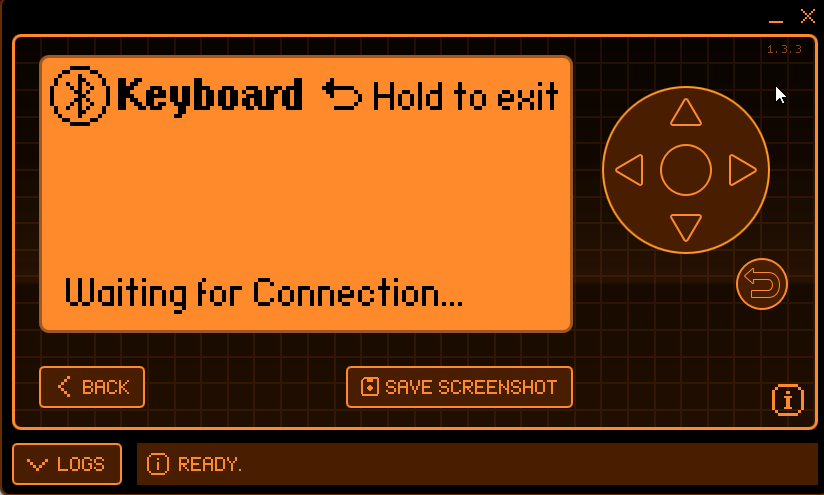
On Kali, we can run scan using bluetoothctl and connect to the flipper zero.
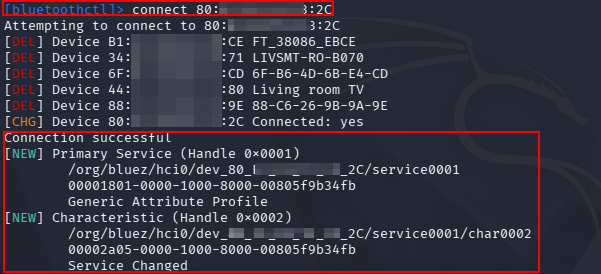
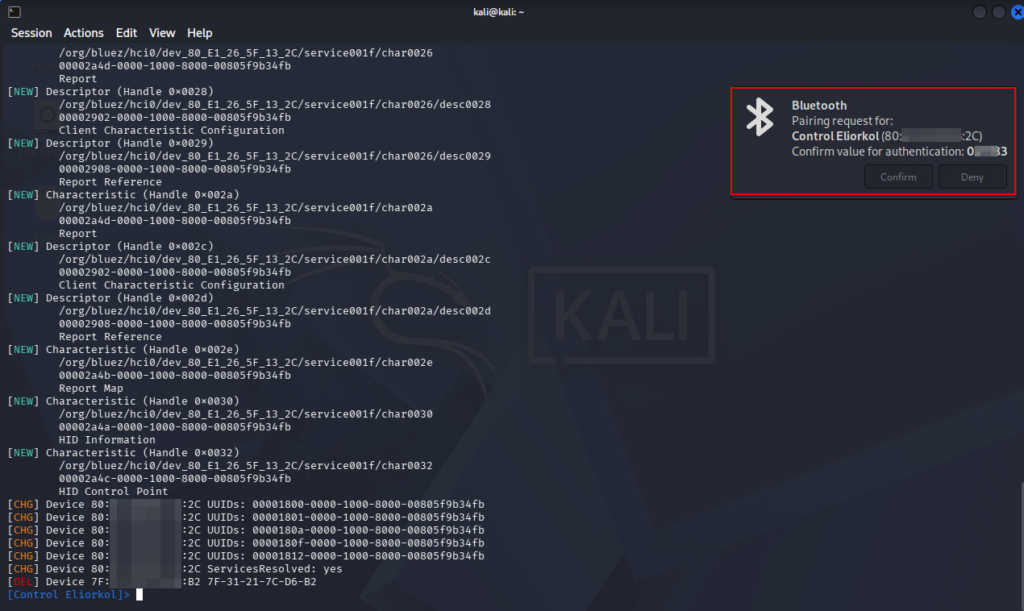
Step 2: Verify Connection
Verify the connection by running the command:
info <MAC Address>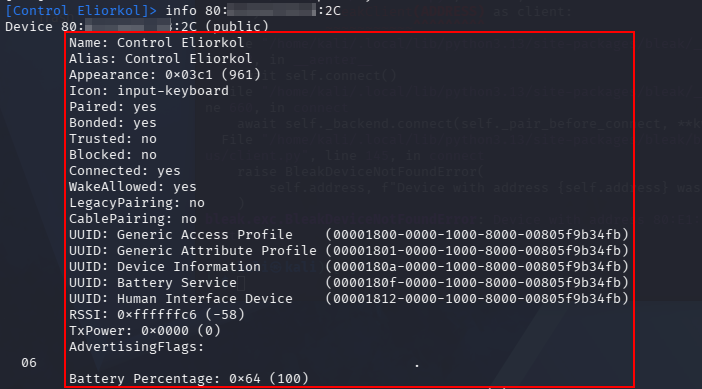
Step 3: Enumerate Services
The easiest tool to use today is Bleak. Run the below mentioned python code to obtain details additional on Services:
import asyncio
from bleak import BleakClient
ADDRESS = "<MAC Address>"
async def main():
async with BleakClient(ADDRESS) as client:
print("Connected:", client.is_connected)
for service in client.services:
print(service)
asyncio.run(main())
Step 4: Enumerate Characteristics
The below mentioned python code can be used to obtain details on Characteristics
import asyncio
from bleak import BleakClient
ADDRESS = "80:E1:26:5F:13:2C"
async def main():
async with BleakClient(ADDRESS) as client:
for service in client.services:
print(f"\nService: {service.uuid}")
for char in service.characteristics:
print(f" Characteristic: {char.uuid}")
print(f" Properties: {char.properties}")
asyncio.run(main())
Standard vs Custom Services
BLE services fall into two categories. 1st is Standard Services and 2nd is Cusotom Services
1. Standard Services: Defined by the Bluetooth SIG. All services use well-known UUIDs. Examples Include:
- Battery Service
- Device Information
- Heart Rate
- Current Time
- Environmental Sensing
2. Custom Services: Manufacturers often create proprietary services. A custom UUID immediately tells us that the vendor has implemented application-specific functionality. These custom services often become the primary focus during security testing.
Step 4 : Enumerate GATT Services
Several tools can enumerate services. One approach is using Python with Bleak.
from bleak import BleakClient
async with BleakClient(mac) as client:
services = await client.get_services()
At this stage, document every discovered service.
Step 5 : Enumerate Characteristics
Every service contains one or more characteristics. Each characteristic has:
- UUID
- Handle
- Permissions
- Properties
Typical properties include Read, Write, Notify, Indicate and Write Without Response. Understanding these permissions is essential because they determine how clients interact with the device.
Reading Public Characteristics
Many BLE characteristics are intentionally readable without authentication. This information is generally harmless but can assist with device fingerprinting and version identification. For Example:
- Manufacturer
- Firmware Version
- Model Number
- Battery Percentage
Identifying Potential Security Issues
During enumeration, security assessors should look for findings such as:
Enumeration alone often uncovers valuable findings without sending a single malicious packet.
Using Flipper Zero for BLE Analysis
The Flipper Zero is particularly useful because it can advertise multiple BLE profiles while remaining easy to identify during testing. During this lab you may observe:
- Device Name
- Public advertisement packets
- Manufacturer information
- Custom services
- Battery information
- Multiple characteristics
Since the Flipper is designed for experimentation, it provides an excellent target for learning BLE enumeration techniques before assessing commercial IoT devices.
Best Practices During BLE Enumeration
When performing BLE enumeration these below mentioned best practices are suggested:
- Avoid sending unnecessary write requests.
- Document every discovered service and characteristic.
- Distinguish between standard and custom UUIDs.
- Record readable values before attempting authenticated access.
- Capture advertisement packets for offline analysis.
- Verify whether characteristics require pairing or authentication before interacting with them.
Following these practices helps ensure the assessment remains controlled and repeatable.
Bluetooth Low Energy enumeration is the foundation of every BLE security assessment. Before attempting any form of exploitation, an assessor must understand how the target advertises itself, which services it exposes, and how those services are structured within the GATT database.
In this guide, we used a TP-Link UB500 Bluetooth adapter together with a Flipper Zero to discover nearby BLE devices, inspect advertising data, connect to a target, enumerate its GATT services and characteristics, and identify information that may be useful during a security assessment. This process closely mirrors the reconnaissance phase performed during professional Bluetooth VAPT engagements.
In the next article, we’ll build on this foundation by capturing BLE traffic, monitoring GATT operations, and exploring practical BLE security testing techniques using tools such as Bettercap, btmon, and Python-based automation.