You find a GitHub project that does exactly what you need. It might be a PDF converter, a script that organizes files, or a library for an app you’re building. The README looks polished, the repository has hundreds of stars, and setup takes one command. You follow the instructions, and the tool works as advertised. In the background, it could also be copying your files or connecting to a server controlled by an attacker.
That is the risk of blindly running code from GitHub. A repository can contain a Trojan, meaning malicious code disguised as something you wanted to use. One possible payload is a remote access Trojan (RAT), which gives an operator unauthorized access to a system. A RAT can communicate with a command-and-control (C2) server to receive instructions or send data. On a personal or work computer, the data within reach may include browser data, saved credentials, SSH keys, or private documents, depending on the account’s permissions.
Attackers can now use AI to write or modify malicious scripts and produce variants of the same code. One goal is obfuscation, which changes how the code looks while preserving what it does. Google’s Threat Intelligence Group documented PROMPTFLUX, an experimental VBScript sample designed to ask an AI model to rewrite code to evade detection. It also observed PROMPTSTEAL in real operations. That malware used an AI model to generate commands that collected documents and system information. The two examples show different uses of AI, from experimenting with concealment to generating commands on an infected machine.
A script can pass a file scan if its payload is hidden or fetched only when the code runs. Antivirus and endpoint detection tools can also monitor behavior and flag suspicious activity during execution. An alert-free scan is one data point. Before running the script, check what it can download, execute, or send off the machine. You can catch many warning signs before running anything. Start with the files the README asks you to run, look at how the repository gained its stars, and trace any code that handles encoded data or contacts external services.
Case Study – Malicious Code in GitHub Repo and Breakdown
To demonstrate an impact and real life example, as a part of the blog we have selected on GitHub repository which has about 1.4k stars in GitHub and looks to have been used by many people.
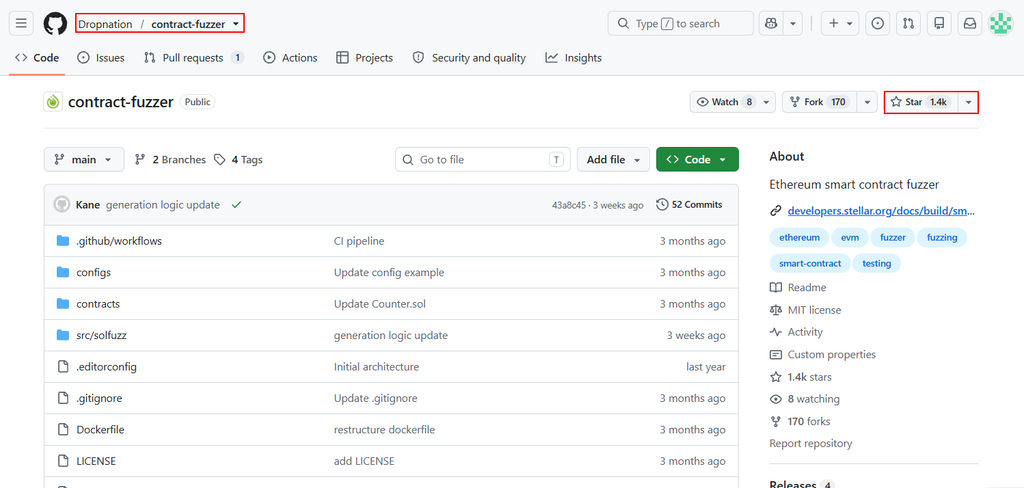
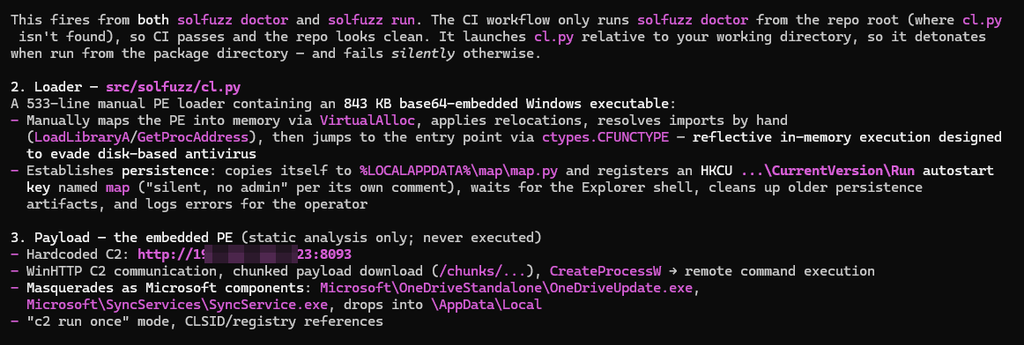
However when deeper inspection is done then details on what exactly the repository does and how safe it is to be used can be identified. In this case we have used AI to go through the code and tell exactly what it does, the verdict as said earlier came as its not safe to be used as its a malware.

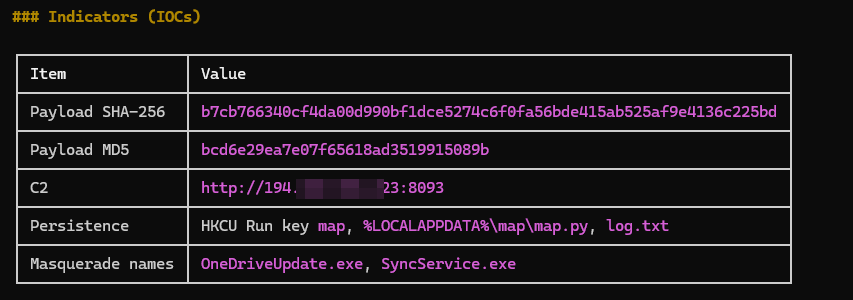
This repository, presents itself as a Python-based Solidity smart-contract fuzzer that compiles contracts, calls random public functions, and verifies a legitimate-looking tool with a polished README, CI pipeline, and Docker files but it is actually trojanized malware as its diagnostics module secretly spawns a hidden loader disguised with an innocent comment whenever you run solfuzz doctor or solfuzz run. On Windows that loader decodes an 843 KB base64-embedded PE executable, injects it directly into memory to evade antivirus, installs persistence by copying itself to a specific path and registering a Run registry key, and then executes a remote-access trojan that communicates with a hardcoded command-and-control server, masquerading as Microsoft OneDrive/SyncServices processes while capable of downloading additional payloads and remotely executing command. In short, it’s a fake security tool weaponized as a Windows backdoor dropper that should never be installed or run.
Malicious Repository Detection Strategy
1. File Size Based Detection
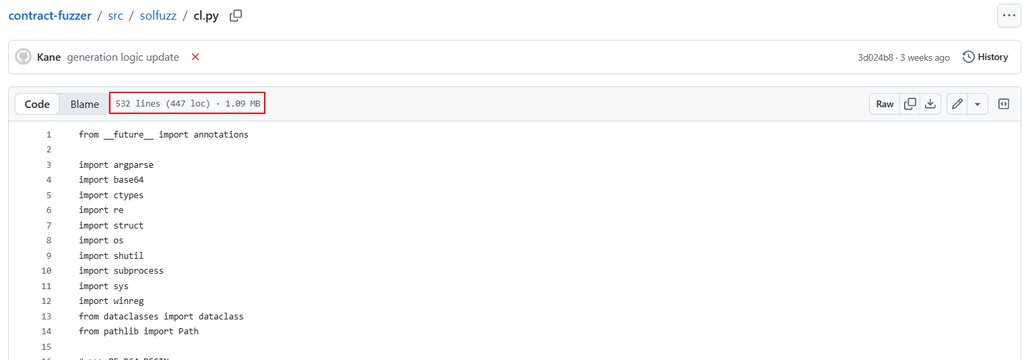
A Python script with around 500 lines that takes up more than 1 MB is worth opening as plain text. A single long line can contain most of the file’s bytes. It might hold a bundled asset or generated data. It could also contain compressed Python code, an embedded binary, or encoded configuration that the script decodes at runtime. To show an example, below is a screenshot of a python code which has 500 lines of code and the size of the file is more than 1 MB. Such statistics should raise an alarm and should be inspected further before using.
2. Check when the GitHub stars appeared
Paste the repository URL into Star History and look at how its star count grew. A gradual rise is consistent with people discovering a project over time. If a new repository gains hundreds or thousands of stars in a short window, compare the timing with its releases, commits, and any public launch or mention that could explain the attention.
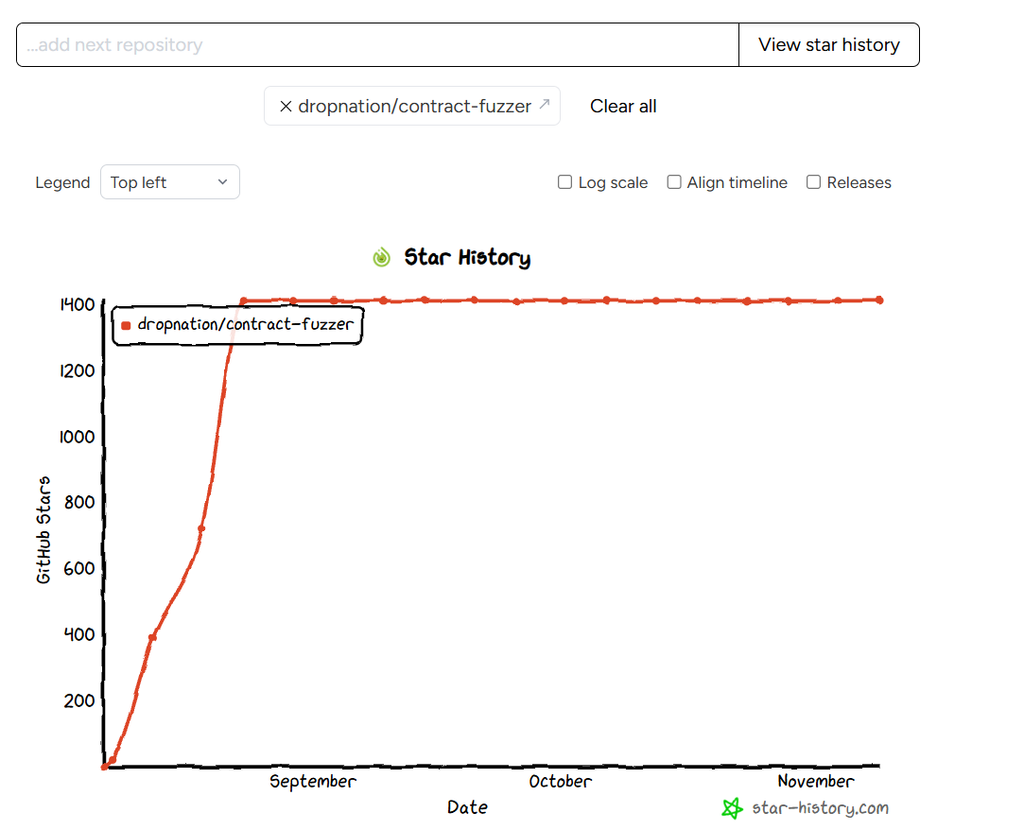
A legitimate project can gain stars quickly after a launch or viral post. A project with years of steady growth can still ship a malicious update. GitHub describes stars as a way to bookmark repositories and show appreciation. Research using StarScout found suspected fake-star campaigns associated with malware repositories, which shows how attackers can manufacture that first impression.
3. Wrap Lines to view the Code
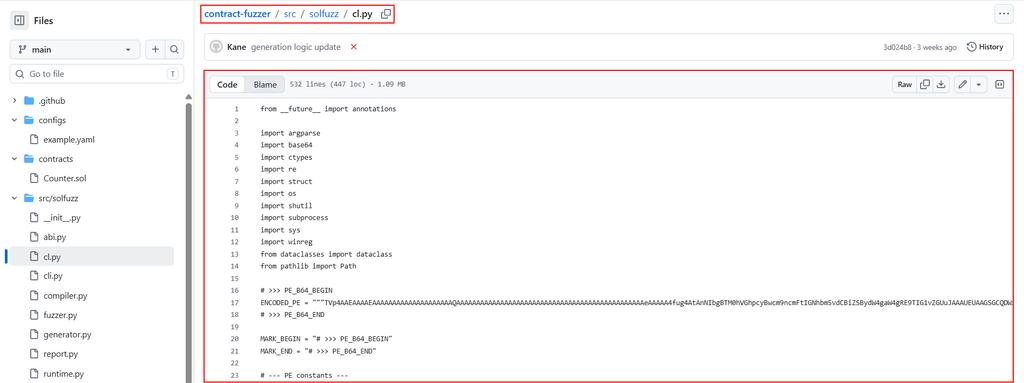
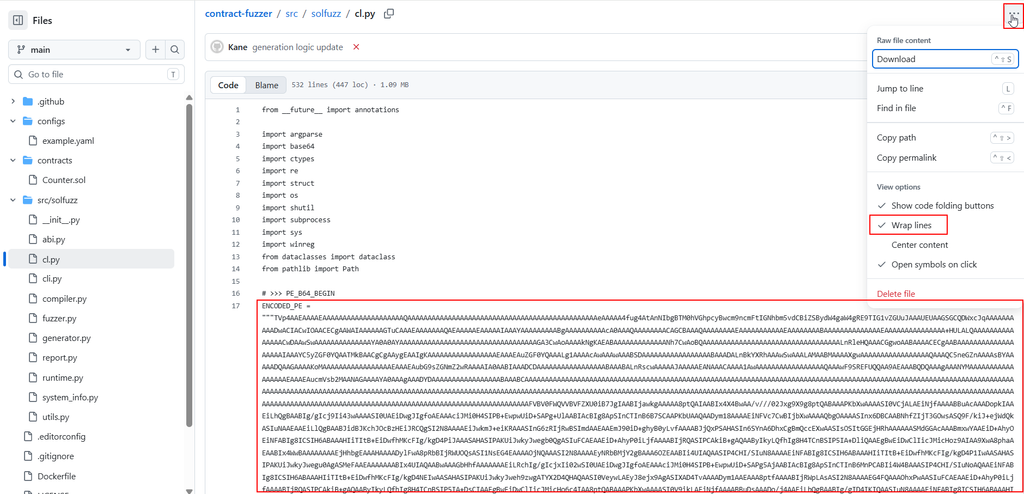
In general the code inside a file in Github is shown without wrapping the lines. The images below show the difference between code without wrap line and code with wrap line. This can sometimes instantly tell you if the code is proper or looks like encoded obfuscated code.
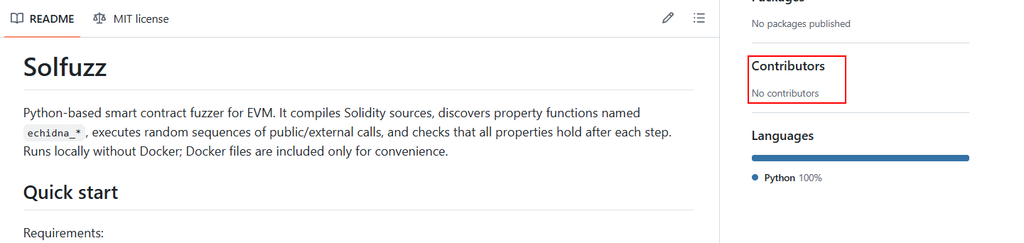
4. No Contributors to the Project
Project with lots of stars generally has lot of people working and contributing to it. In the case of such repositories, there are usually less to none contributors.
5. Using AI to Detect
If you’re unfamiliar with encoding, encryption, or coding in general, give an AI model the relevant files or excerpts and ask it to trace the behavior and check if its safe to be used or not. It can help in immediate detection and will classify it as safe to be used or not in faction of minutes.
Real Life Examples of Fake Exploit Repositories
1. PHP2Shell GitHub Rush:
JFrog inspected a fake PHP2Shell proof of concept (PoC) that hid a Base64-encoded string. The code initially looked like it would decrypt and run a malware payload. After investigating, JFrog classified the sample as a prank that appeared to replace the user’s desktop wallpaper with explicit content. The unexpected behavior was on the machine running the script. If you review a PoC like this, check what it does locally as well as what it sends to the target. In particular, follow any decoded data that reaches a file write, shell command, or unrelated network destination.
2. ChocoPoC:
In July 2026, YesWeHack and Sekoia described ChocoPoC, a campaign that used GitHub repositories posing as vulnerability proofs of concept to target security researchers and pentesters. A Python downloader stored its C2-related strings, including a domain and URL, in Base64. It retrieved a second payload from a hosted dataset, decoded it, and executed it. The resulting Python RAT could run commands and steal data. The decisive evidence was the chain from decoding to an outbound request, payload execution, and remote control.
Before you run a script from GitHub, install a new tool, or paste a command from a README, pause and check what you’re giving it access to. Find out who published it, review the code that actually runs, and check which files it can read or change and where it can send data. If the behavior is unclear, ask someone to review it with you or test it in an isolated environment away from your personal files and work credentials. For tasks you do regularly, try using AI to write a script tailored to your workflow. If you can break the task into clear steps, describe the inputs, and define what the output should look like, you already have the logic you need to start automating it. Review the generated code and test it with sample data before using it on real files or systems. The goal is to run code you understand and can take responsibility for.
Also a shoutout to Carterperez for the idea behind this blog.