
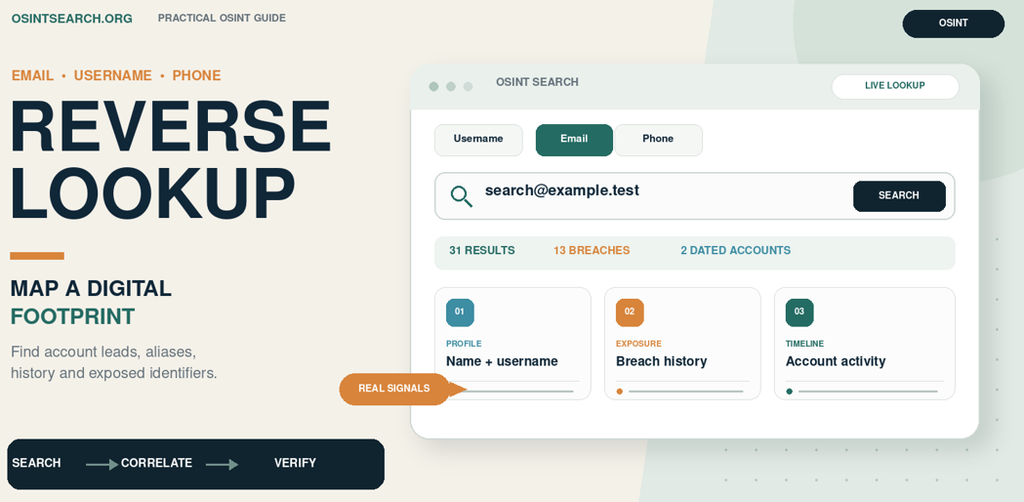
Open-source intelligence (OSINT) often begins with a small piece of information sometimes like a username, an email address, or a phone number. Each identifier can act as a pivot to public profiles and other clues, but a search result is only useful when its source and context are checked. This walkthrough looks at the three reverse-lookup flows available through the OSINTsearch dashboard. It explains what to enter, what kinds of results to look for, and how to turn a possible match into a defensible research lead.
What reverse lookup means in OSINT
Reverse lookup starts with an identifier and asks supported sources whether they return related accounts or profile information. A username search looks for the handle across platforms. An email lookup searches for accounts or signals associated with an address. A phone lookup searches for accounts or profile details associated with a number.
These searches can reduce repetitive manual checking and help an investigator decide what to examine next. They do not prove that one person owns every returned account. Handles can be reused or copied, email addresses can be shared or become outdated, and phone numbers can be reassigned. Treat every match as a lead until it is corroborated.
Flow 1: Username Reverse Lookup
Start with a username when you have a handle from a public profile, a suspicious message, a domain or community investigation, or an authorized test account. The objective is to discover whether supported sources return profiles using that handle and to compare the returned details.
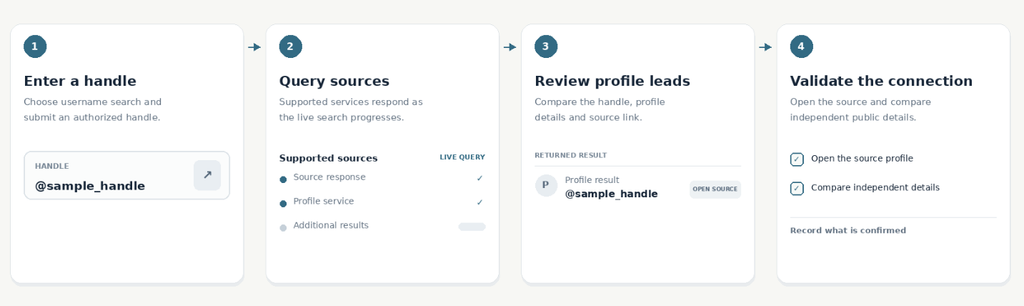
OSINTsearch describes username results as leads from supported platforms and communities. Depending on the source and access level, a result may include profile details such as a display name, bio, counts, dates, or location; some sources may provide only an account-presence signal. A matching handle tells you that a source returned an account with that handle. It does not establish that the same person controls other accounts with the same spelling. Look for corroborating details that are independently visible, such as a consistent link from a known profile, a unique portfolio URL, or matching public statements.
Example 1: Breach Check, Username Timeline, Accounts Across Different Platforms
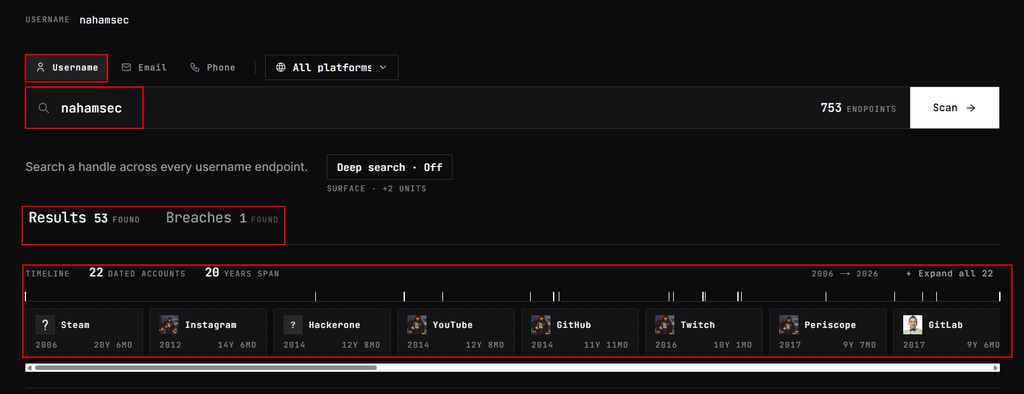
A username search can reveal more than profiles currently using a handle. In these results, the dashboard reports 53 matches and one breach record, and shows a timeline of 22 dated accounts spanning 2006–2026 across platforms such as Steam, Instagram, YouTube, GitHub, and Twitch. Profile cards and linked-account references can add context such as former usernames, account dates, and related handles—helping an investigator trace a digital footprint over time. Treat these as leads: reused usernames and outdated records can create false associations, and a breach indicator alone does not show that an account is currently compromised.
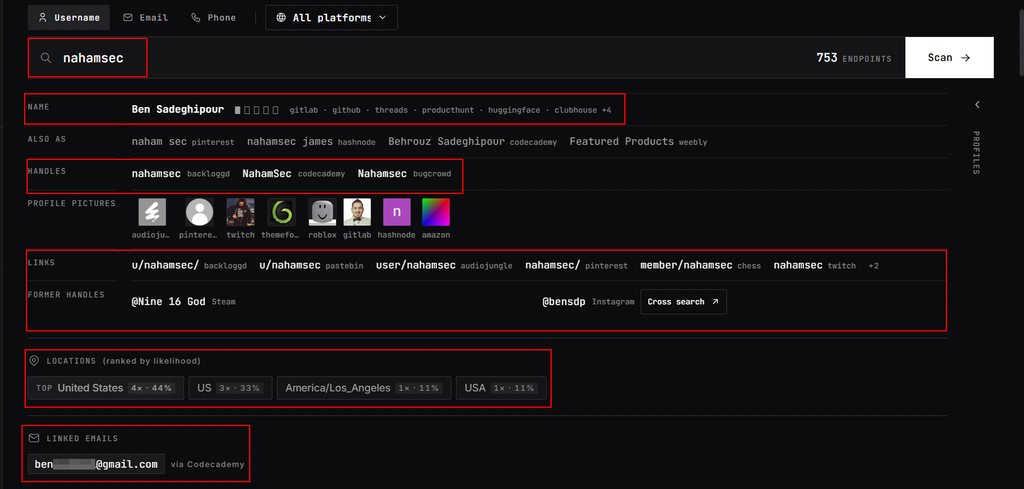
Example 2: Names, User Details, Personal Email Address etc
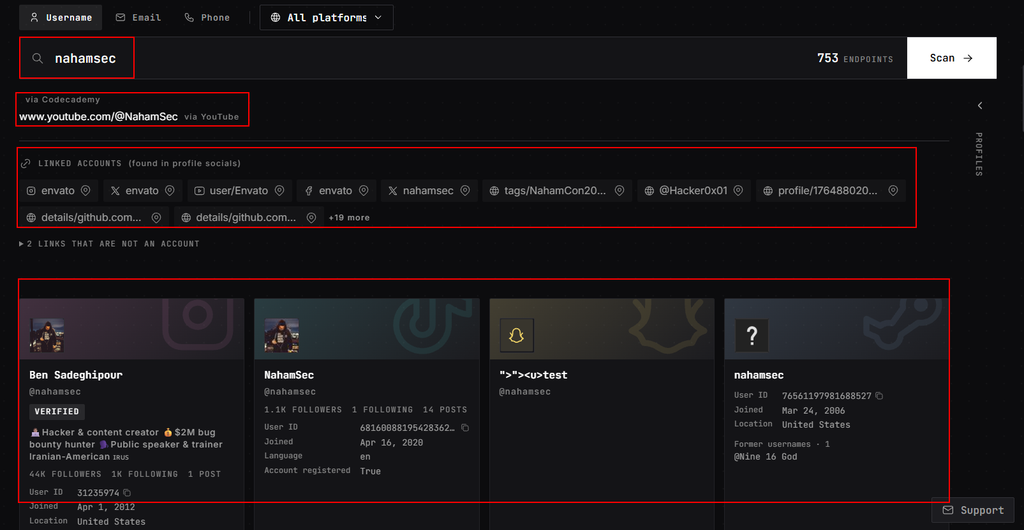
A username lookup can reveal a broader set of identity clues than a list of matching profiles. In this example, the dashboard connects the searched handle with a name, related and former usernames, profile images, links across platforms, location indicators, and a partially masked email address reported by a source. These details can help an investigator trace how an online identity appears across services and identify useful follow-up leads. Each association still needs to be checked at its source: linked details may be outdated, shared, or incorrectly matched, and ranked location indicators should not be treated as a precise or current location.
Flow 2: Reverse Email Lookup
An email address can be a useful pivot during an authorized digital-footprint review, a suspicious-sender investigation, or a permitted security assessment. A reverse email search checks whether supported sources return accounts or profile information associated with the address.
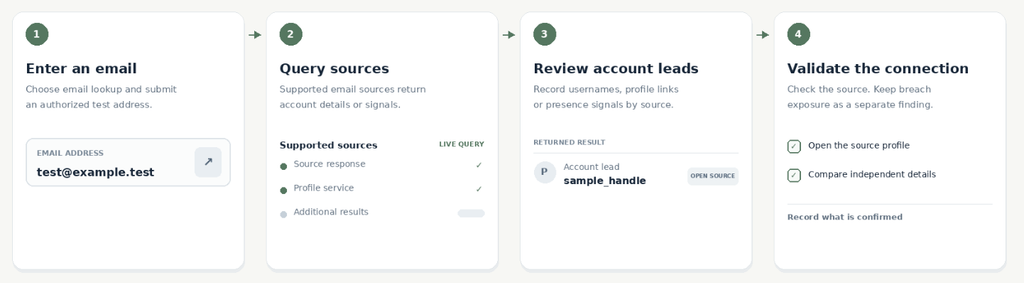
The public workflow description says that an email lookup queries supported sources on demand and groups returned account leads by platform. The available fields and completeness depend on the source and account access. Shared addresses, stale registrations, and incomplete responses can create misleading or missing matches.
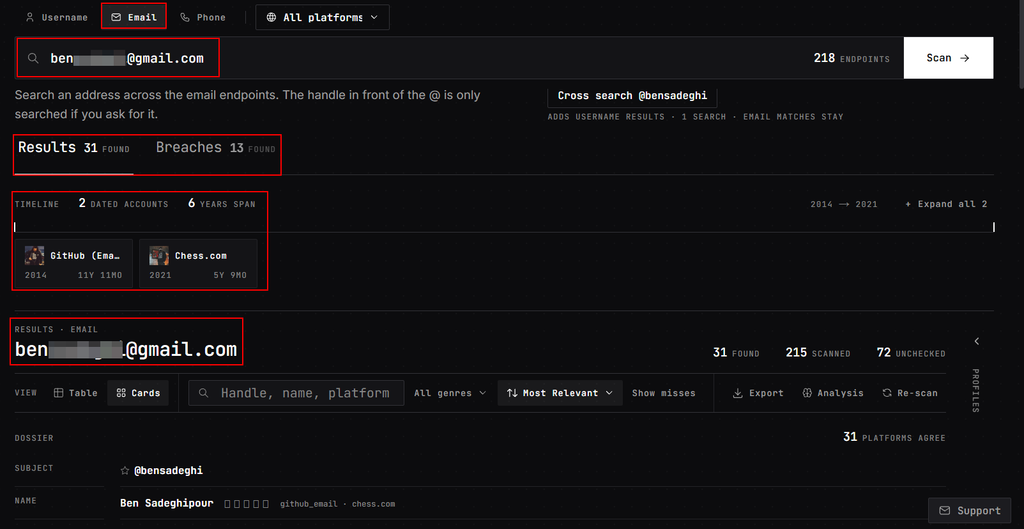
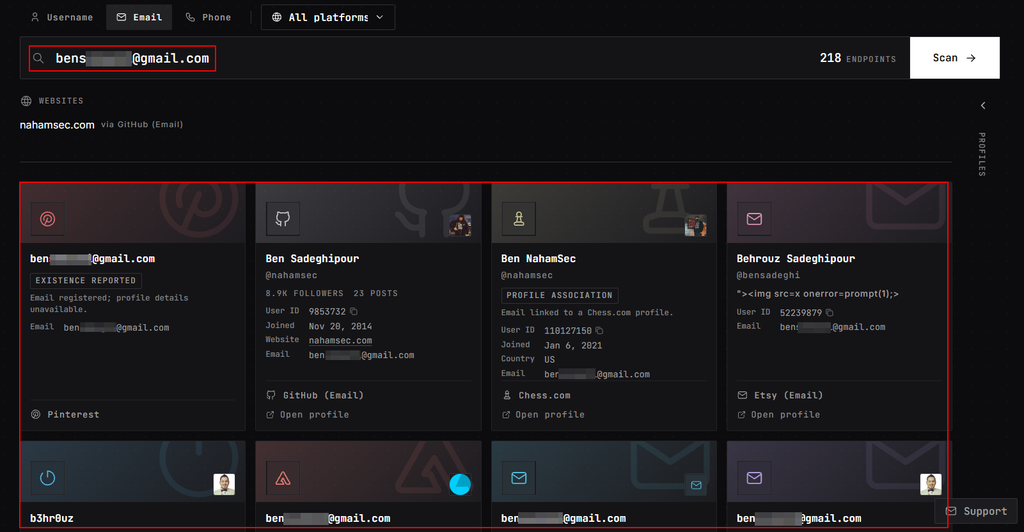
Example: Breach Check, Email Address Timeline, Accounts Across Different Platforms
An email lookup can reveal several useful OSINT leads in one search. In these screenshots, the dashboard reports 13 breach matches and a timeline of two dated accounts spanning 2014–2021; the result cards also show associated usernames, names, profile links, account dates, and other available profile details. This can help an investigator trace where an address appears and identify usernames for follow-up searches. Breach indicators describe reported historical exposure, not necessarily a current compromise, and profile associations should be verified at their original sources. Before publishing, redact the email address and any identifying details.
Flow 3: Phone Number Reverse Lookup
Phone lookup can support a review of your own exposure or an authorized investigation into a suspicious call or message. It checks whether supported sources return account leads or profile information associated with a number.
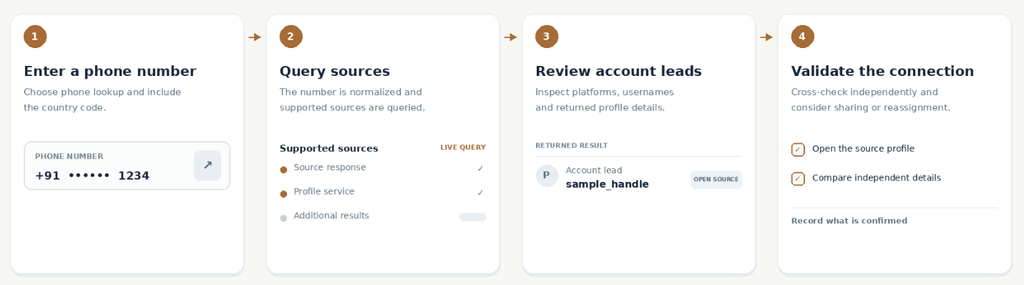
OSINTsearch describes its phone workflow as an on-demand query that normalizes the input and groups returned leads by platform. Returned details depend on the source and available access. Because numbers may be shared or reassigned, an old association can point to someone other than the current number holder. For demonstration purpose we will see a some examples.
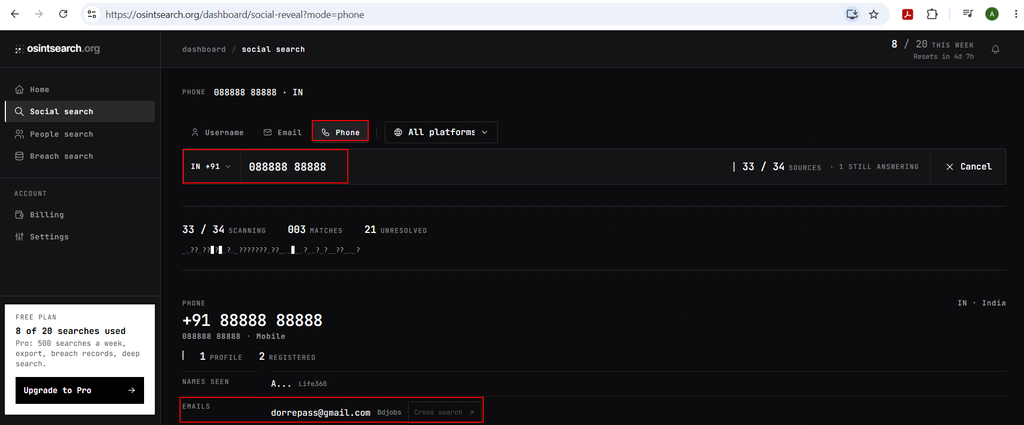
Example 1: Using Random Phone Number Like +918888888888
This phone-number lookup shows how reverse searching a number can expose more than linked social accounts: the result also displays an associated email address, creating a pivot from a phone number to a digital identity. That connection may increase privacy and phishing risks if the email is exposed alongside other profile details. Treat the result as a lead until verified against its source, and redact the phone number and email address before publishing the screenshot.
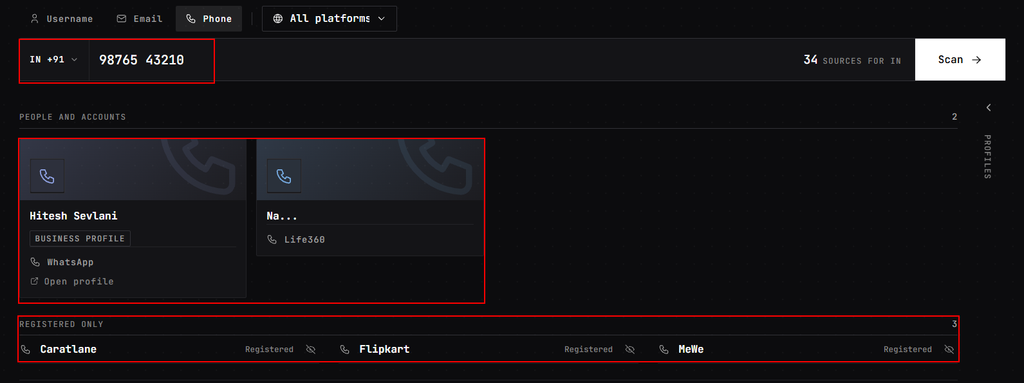
Example 2: People, Names and Different Accounts Associated with the Number
This phone-number lookup demonstrates how a number can act as a pivot to a person’s possible identity and online accounts. The results show a named business profile, messaging and social-service links, and account-presence indicators for services such as CaratLane, Flipkart, and MeWe. Together, these clues can help an investigator build a broader picture of the number’s public digital footprint but registered-account indicators do not prove who currently owns or uses the number. Verify each lead at its source, and redact the number and name before publishing.
Email, username, and phone number reverse lookups give an OSINT investigator three practical starting points for finding account leads. OSINTsearch brings those workflows into one dashboard and can make it easier to compare results and choose a next pivot. The quality of the investigation still depends on source-level validation, careful handling of personal data, and conclusions that match the evidence.
For a useful demonstration, show each lookup from input to source result, then include one validation step and a clear statement of uncertainty. That gives readers a repeatable process while making clear that a lookup result is a lead—not an identity verdict.