
An Android application may refuse to run on a rooted device, reject a testing proxy’s certificate, or terminate when instrumentation is detected. These behaviours can interrupt an assessment before the tester reaches the application’s authentication, local storage, or API functionality. Magisk helps create a flexible Android testing environment. Combined with carefully selected modules, it supports traffic inspection, runtime analysis, and controlled testing of application protections. Its value comes from making application behaviour easier to observe and investigate.
This article explains where Magisk fits into mobile application penetration testing and presents five useful modules: AlwaysTrustUserCerts, MagiskFrida, ZygiskFrida, LSPosed, and Shamiko. The selection is based on practical assessment tasks rather than a popularity ranking.
What Is Magisk?
Magisk provides root management and a module system for modifying an Android environment. Its systemless approach allows many changes to be applied through mounts and boot-time mechanisms rather than directly rewriting files in the system partition. However, “systemless” does not mean the device remains unmodified: installing Magisk typically involves patching a boot-related image. Three concepts matter during an assessment:
- Root access: Elevated privileges that help a tester inspect protected areas of the lab device.
- Magisk modules: Installable packages that add functionality or change aspects of the testing environment.
- Zygisk: Magisk’s mechanism for running module code within Android application processes, used by certain instrumentation and hooking tools. ZygiskFrida documentation
Magisk establishes the environment. Tools and scripts running within that environment perform the actual analysis. Installing Magisk alone does not automatically intercept traffic, bypass certificate pinning, or identify vulnerabilities.
Prepare a Reliable Testing Device
Use a dedicated Android device or compatible emulator with the application and test accounts covered by the engagement. Keep a clean baseline available for comparison. Magisk installation is device-specific. The appropriate image may be boot.img, init_boot.img, or recovery.img, and some manufacturers require a different workflow. Follow the official instructions for the device and firmware rather than applying a generic flashing command. The Magisk documentation specifically warns against flashing another person’s patched image. Before adding modules, record:
- Device model, Android version, security patch level, and CPU architecture.
- Magisk version and whether Zygisk is enabled.
- Application version, package name, and APK hash.
- Module versions, download sources, and configuration changes.
- Proxy and instrumentation tool versions.
Install modules individually and check application behaviour after each change. A small, documented configuration makes failures much easier to diagnose than a device containing every available testing module.
The Five Modules at a Glance
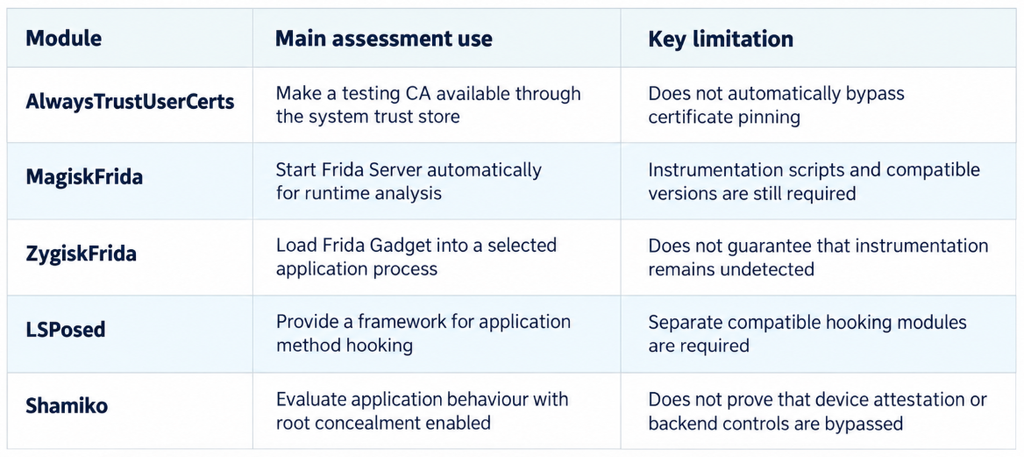
The individual project references and compatibility considerations are discussed below. These modules are options for different tasks; there is no requirement to enable all five together.
1. AlwaysTrustUserCerts: Simplifying HTTPS Traffic Inspection
AlwaysTrustUserCerts, previously known as MagiskTrustUserCerts, makes installed user CA certificates available through the system certificate store. The project documents support for Android 7–16 and accounts for both traditional and Conscrypt/APEX certificate locations. Confirm compatibility with the exact device build before relying on it. This addresses a common proxy setup problem. Apps targeting Android 7.0/API 24 or later do not trust user-added certificate authorities by default, although an app can explicitly configure that trust. Consequently, installing Burp Suite’s CA as a user certificate may be insufficient for an application that relies on the platform’s default trust configuration. For a lab setup, install the proxy CA as a user certificate, install the module following its documentation, and restart the device. Configure the application’s traffic to reach the proxy and repeat a known request. The module’s documented certificate removal process also requires a restart. Module usage instructions
If interception works, the modified environment now satisfies the trust checks exercised by that connection. It does not establish that the unmodified application accepts arbitrary certificates. If interception still fails, investigate proxy routing, custom trust stores, certificate pinning, or a different networking stack. Adding a trusted CA and bypassing certificate pinning are separate tasks.
2. MagiskFrida: Keeping Frida Server Ready for Analysis
MagiskFrida runs Frida Server at boot, reducing the repeated setup needed during testing sessions. Its repository lists ARM, ARM64, x86, and x86_64 support and directs users to its release packages rather than the obsolete Magisk modules repository. Frida enables runtime instrumentation: observing or modifying functions while an application executes. A tester can use this to investigate data transformations, trace selected methods, or understand a security decision. The module provides the server; the actual behaviour depends on the Frida script and the application. After installing a compatible release and rebooting, a basic workstation-side connectivity check is:
adb devices
frida-ps -U
The first command checks the ADB connection. The second asks Frida to enumerate processes on the USB-connected device. A process list confirms basic connectivity; it does not prove that a specific application can be instrumented successfully. For repeatable assessments, record the Frida versions on both sides and avoid unplanned updates midway through testing. Use matching client and server versions to reduce compatibility problems.
Best fit: Routine dynamic analysis where a standard Frida Server workflow is suitable. Automatic startup is a convenience, not a root-detection or anti-instrumentation bypass.
3. ZygiskFrida: Loading Frida Gadget Without Repackaging the APK
ZygiskFrida uses Zygisk to inject Frida Gadget into an application process. Its documented approach avoids embedding Gadget into the APK and therefore avoids the APK modifications associated with that embedding process. It also offers control over injection timing. This is useful when repackaging would interfere with the behaviour being assessed. For example, an application may verify its signing certificate or APK contents. Keeping the original APK while introducing runtime instrumentation allows a different testing approach.
Configure the intended application package according to the project’s instructions, then validate instrumentation against a known method. Keep the configuration scoped to the assessed application. How to interpret the result: Successful injection demonstrates that this instrumentation approach works in the tested environment. It does not establish that all anti-tampering controls have been defeated. Runtime checks may still detect the injected library, altered behaviour, or other environmental signals. Choose between MagiskFrida and ZygiskFrida according to the testing objective. They offer different ways to introduce Frida; enabling both by default can complicate troubleshooting.
4. LSPosed: A Framework for Application Hooking
LSPosed provides an Android Runtime hooking framework compatible with Xposed-style modules. Its Zygisk variant can be installed through Magisk. The upstream README inspected for this article lists Android 8.1–14 support; do not assume that an older release supports newer Android versions. Check the exact distribution, release, and maintainer when selecting a build. The distinction between the framework and its modules matters. LSPosed supplies the hooking infrastructure. Separate LSPosed/Xposed modules implement particular changes. Installing the framework alone does not automatically disable certificate pinning or root detection.
During an assessment, a compatible module or a purpose-built hook can help investigate how a Java method influences application behaviour. For example, a controlled change to a local security decision can reveal whether that decision only controls the interface or whether the backend independently enforces access. Method hooking is also covered in the OWASP Mobile Application Security Testing Guide. OWASP method hooking
Best fit: Repeatable, application-scoped method-hooking experiments. Record both the LSPosed build and the actual hooking module; naming only the framework is insufficient for reproduction.
5. Shamiko: Testing Root-Detection Resilience
Shamiko is used for root concealment in Zygisk-based environments. Its release history includes changes to hiding behaviour and compatibility fixes, including Frida compatibility. This makes the exact release and configuration relevant to assessment results. Its practical value is comparative testing. First record what the application does on the rooted device without concealment. Then enable the supported configuration and repeat the same workflow. Does the app still block startup? Does it display a warning? Does it allow navigation but reject a sensitive operation later?
Do not treat a change in the startup screen as proof that every integrity control has been bypassed. Local root checks, device integrity signals, and backend enforcement need separate validation. How to report the result: Describe the application version, device, module configuration, initial restriction, and exact action that became possible. Establish business impact separately. An application opening after concealment does not by itself demonstrate unauthorized access or justify a high-severity finding.
Common Mistakes to Avoid
- Installing every module together: Conflicting changes make it difficult to identify the cause of crashes or successful bypasses.
- Confusing CA trust with pinning: A system-trusted proxy certificate may still be rejected by application-specific checks.
- Mixing Magisk and LSPosed modules: They belong to different installation and execution layers, even when used in the same lab.
- Reporting a modified environment as the default: Always disclose when interception or access depended on root, hooks, or changed trust settings.
- Assuming compatibility from the project name: Record the exact release and validate it against the device’s Android build.
- Stopping after a bypass: Continue to the relevant storage, authentication, authorization, or transaction test and establish the actual impact.
Magisk is a useful foundation for Android application penetration testing because it gives testers greater control over the assessment environment. AlwaysTrustUserCerts helps with certificate trust, MagiskFrida and ZygiskFrida support different instrumentation approaches, LSPosed enables method-hooking workflows, and Shamiko supports root-detection resilience testing.
The quality of the assessment depends on how these capabilities are used. Introduce one change at a time, preserve a baseline, and connect every observation to a specific security boundary. A successful bypass is a starting point for deeper analysis; the strongest findings explain what became possible, which control failed, and why that matters to the application and its users.