
Active Directory enumeration is often associated with LDAP, SMB, Kerberos, BloodHound, PowerView, or tools such as NetExec. However, another extremely useful source of information is frequently overlooked: Microsoft Remote Procedure Call (RPC). RPC is deeply integrated into Windows. Numerous Windows services expose functionality through RPC interfaces, including account management, security policy queries, service management, share enumeration, and remote administration.
From an Active Directory penetration testing perspective, RPC becomes particularly interesting because interfaces such as SAMR, LSARPC, and SRVSVC can sometimes expose valuable information about users, groups, password policies, domain information, trusts, and shared resources. In poorly configured environments, some of this information may even be obtainable without valid domain credentials. This article explores how RPC works in an Active Directory environment and demonstrates practical enumeration using rpcclient.
What Is RPC?
Remote Procedure Call is a mechanism that allows a program running on one computer to execute functionality exposed by another computer. Instead of an application having to understand every underlying network operation, it can call a remotely exposed procedure almost as though it were a local function. Windows relies heavily on RPC for administration and communication between services. For penetration testers, this is important because several Windows RPC interfaces expose information useful during reconnaissance and Active Directory enumeration. Microsoft’s SAM Remote Protocol, for example, provides management functionality for account stores containing users and groups. Microsoft specifically describes SAMR as supporting operations involving users, groups, and computers. RPC should therefore not be viewed simply as “port 135.” It is an underlying communication mechanism used by many Windows services.
One of the first things a tester normally notices during a network scan of a Windows server or Domain Controller is TCP port 135. TCP 135 is commonly associated with the RPC Endpoint Mapper. RPC applications can subsequently use dynamically allocated ports. Modern Windows versions use the dynamic TCP range 49152–65535 by default, although configurations can be changed by administrators. RPC communication can also occur through named pipes over SMB. This distinction is particularly important when using rpcclient.
RPC Interfaces Useful During Active Directory Enumeration
Several RPC interfaces are interesting during Windows and Active Directory security assessments. Three are particularly useful.
1. SAMR – Security Account Manager Remote Protocol
SAMR allows clients to interact with account information. From an enumeration perspective, it can expose information relating to:
- Domain users
- Domain groups
- Group membership
- User information
- Domain password information
- Domain information
- Aliases
- RIDs
Microsoft describes the SAM Remote Protocol as supporting management of an account store or directory containing users and groups. For an attacker or penetration tester, user enumeration alone can significantly improve subsequent Active Directory reconnaissance. Instead of attempting to guess usernames, SAMR may potentially provide an authoritative list.
2. LSARPC – Local Security Authority RPC
The Local Security Authority RPC interface can expose information relating to security policy and identifiers. Depending upon permissions, this may include:
- Domain SID
- Security policy information
- SID-to-name mappings
- Trusted domains
- Privileges
- Account rights
Samba’s rpcclient exposes commands such as lsaquery, lookupsids, lookupnames, enumtrust, and privilege-related queries through LSARPC. This becomes especially useful when correlating RIDs, SIDs, usernames, groups, and trusted domains.
3. SRVSVC – Server Service RPC
SRVSVC provides information concerning the Windows Server service. For reconnaissance, it can sometimes expose details such as server information and available network shares. Samba’s current rpcclient implementation includes commands including:
- srvinfo
- netshareenum
- netshareenumall
- netsharegetinfo
Finding an accessible share can lead to an entirely different enumeration path if administrators or developers have unintentionally stored scripts, configuration files, backups, documentation, or credentials inside it.
Introducing rpcclient
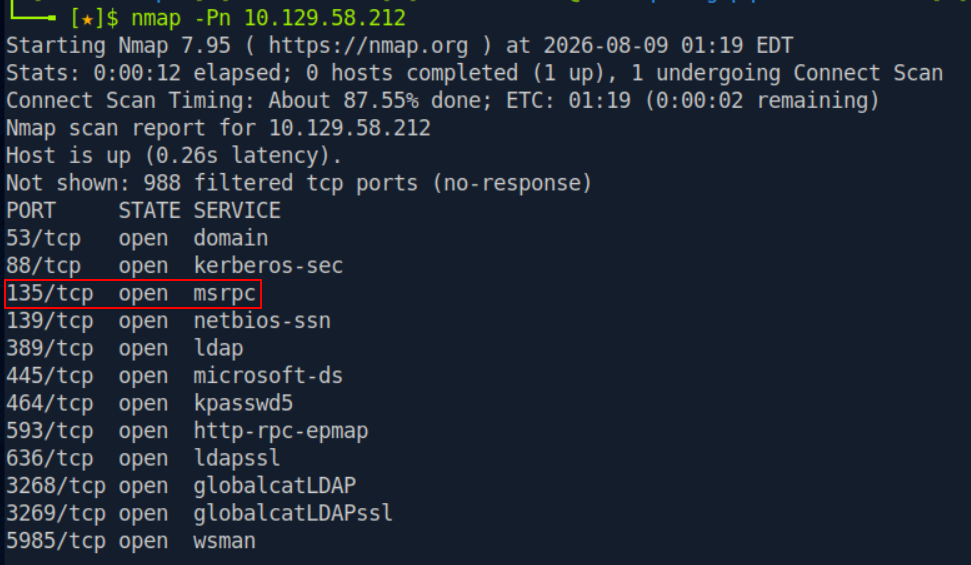
One of the simplest tools for manually interacting with Windows RPC services from Linux is rpcclient. rpcclient is part of the Samba suite and was originally developed for testing MS-RPC functionality. It has since become useful for administrative and security-testing workflows. A basic connection looks like:
rpcclient -U 'DOMAIN/username' <TARGET_IP>The tool will prompt for the user’s password. Once authenticated, an interactive console appears:
rpcclient $>From here, individual RPC queries can be executed.
Testcases To be Performed
Testcase 1: Test Anonymous RPC Access
During an internal penetration test, one of the first things worth testing is whether RPC queries can be performed without supplying domain credentials. Try:
rpcclient -U "" -N <TARGET_IP>The -N option tells rpcclient not to request a password. Samba documents both the user authentication option and no-password operation in the current rpcclient syntax.
If successful, you should see:
rpcclient $>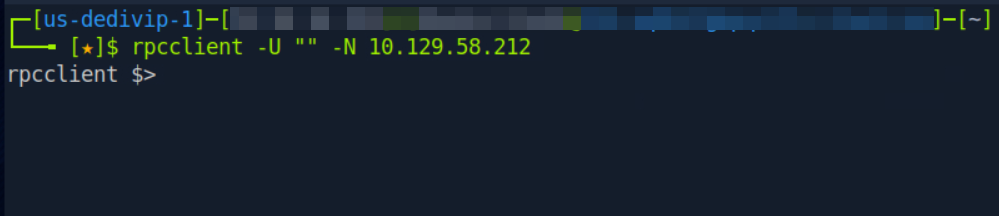
A successful connection does not automatically mean every RPC operation will work. Different RPC interfaces and individual calls can have different authorization requirements. That is exactly why manual testing is useful.
Testcase 2: Identify Domain Information
If we are successful then we should Start with:
lsaqueryDepending upon the configuration, the response may expose information such as the domain name and SID. A sanitized example might look similar to:
Domain Name: LAB
Domain Sid: S-1-5-21-XXXXXXXXXX-XXXXXXXXXX-XXXXXXXXXX
The SID becomes useful later when correlating users and RIDs. You can also try enumdomains and querydominfo
These queries help establish information about the domain being examined.
Testcase 3: Enumerate Domain Users
This is where RPC enumeration becomes particularly valuable. Execute the below query:
enumdomusers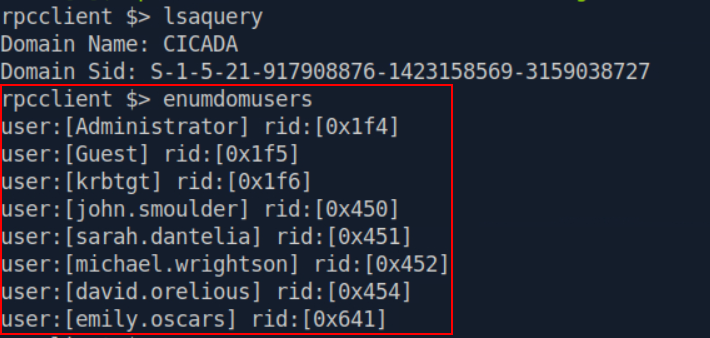
A vulnerable or sufficiently permissive configuration might return:
user:[Administrator] rid:[0x1f4]
user:[Guest] rid:[0x1f5]
user:[krbtgt] rid:[0x1f6]
user:[john.smith] rid:[0x451]
user:[backup.service] rid:[0x452]
user:[sql.service] rid:[0x453]
Samba documents enumdomusers specifically as a command for enumerating domain users. For an Active Directory penetration tester, the result is extremely useful. We have moved from Unknown Active Directory environment to Validated domain username list without interacting with LDAP directly. The usernames can subsequently feed authorized testing involving Kerberos enumeration, SMB access testing, password-policy analysis, credential auditing, or BloodHound collection.
Testcase 4: Use querydispinfo
Another particularly useful command is:
querydispinfoSamba exposes this command through the SAMR functionality of rpcclient. Depending upon what the server allows, display information may reveal additional context concerning accounts. For example:
Account: john.smith
Name: John Smith
Account: svc_backup
Name: Backup Service
Account: svc_sql
Name: SQL Database Service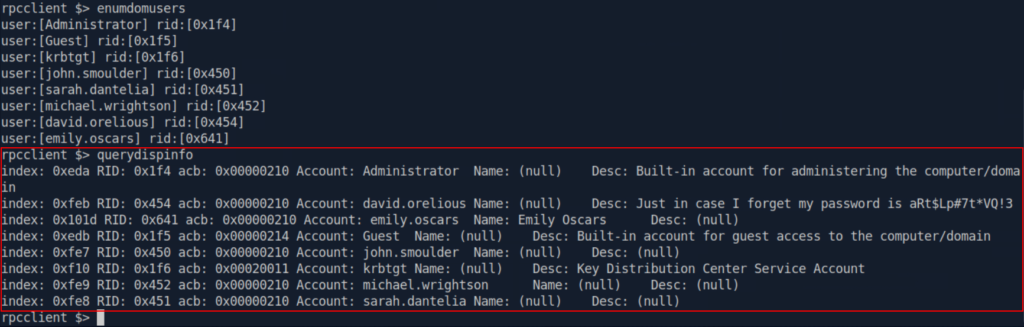
This information becomes useful because account naming and descriptions can reveal the function of an account. A penetration tester may immediately identify potentially interesting accounts such as:
- backup
- sql
- exchange
- administrator
- helpdesk
- deployment
- service
- monitoring
The account itself is not necessarily vulnerable. The purpose is to prioritize further enumeration.
Testcase 5: Query a Specific User
Notice that enumdomusers returns a RID alongside each account. Suppose an account returns:
user:[svc_backup] rid:[0x452]We can attempt to obtain additional information using:
queryuser 0x452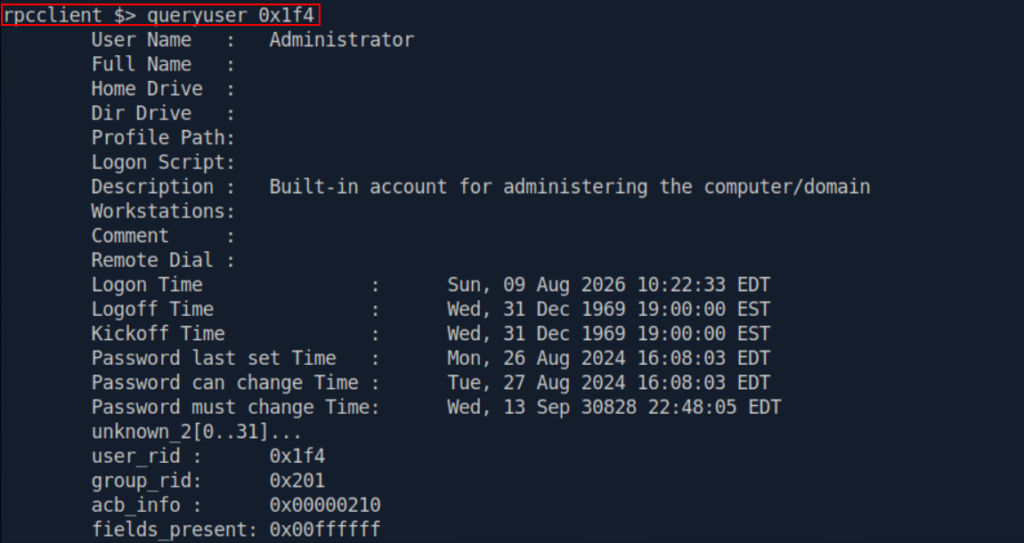
Samba exposes queryuser through SAMR specifically for querying user information. The information available varies depending upon server configuration and permissions. During a penetration test, pay particular attention to metadata that reveals:
- Account purpose
- Full name
- Account description
- Account state
- Password-related properties
- Group relationships
- Operational comments
Account descriptions should never contain passwords, password patterns, or operational secrets. Surprisingly, internal assessments occasionally uncover precisely this kind of information.
Testcase 6: Enumerate Domain Groups
Users tell us who exists. Groups tell us who may matter. Execute:
enumdomgroupsSamba documents this command for enumerating domain groups. You may encounter groups such as:
- Domain Admins
- Domain Users
- Domain Controllers
- Enterprise Admins
- Backup Operators
- Account Operators
- Remote Desktop Users
- IT Support
- SQL Administrators
- Server Administrators
Custom groups can sometimes be even more interesting than built-in groups. For example:
- Production Server Admins
- Database Administrators
- Helpdesk Password Reset
- Workstation Administrators
- Backup Management
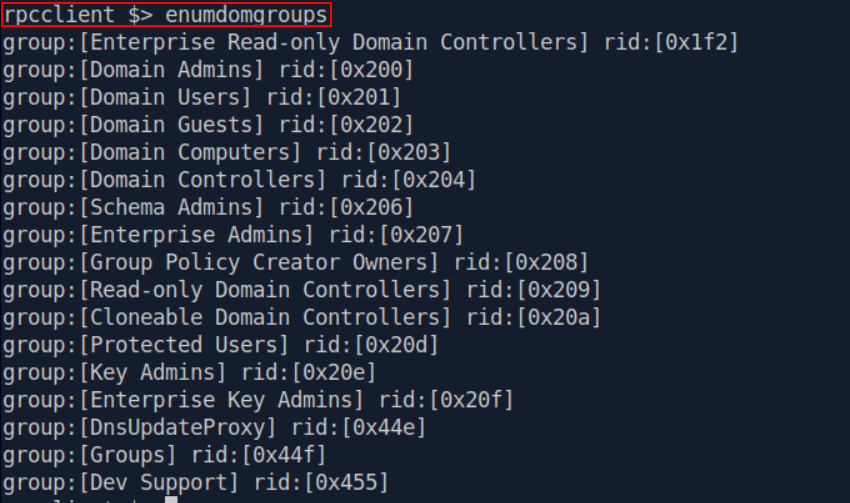
These names begin to reveal how privilege is structured inside the organization.
Testcase 7: Enumerate Group Membership
After identifying an interesting group and its RID, further information can be requested using querygroup and querygroupmem
Samba exposes both group information and group-membership queries through SAMR. The returned RIDs can then be correlated back to accounts. This approach can help answer questions such as:
- Who belongs to an administrative group?
- Are service accounts members of privileged groups?
- Are unusual accounts present in operational groups?
- Are legacy administrator accounts still present?
RPC enumeration is therefore not simply about obtaining usernames. It can contribute to understanding the privilege structure of the domain.
Testcase 8: Enumerate Password Policy Information
Another useful query is getdompwinfo
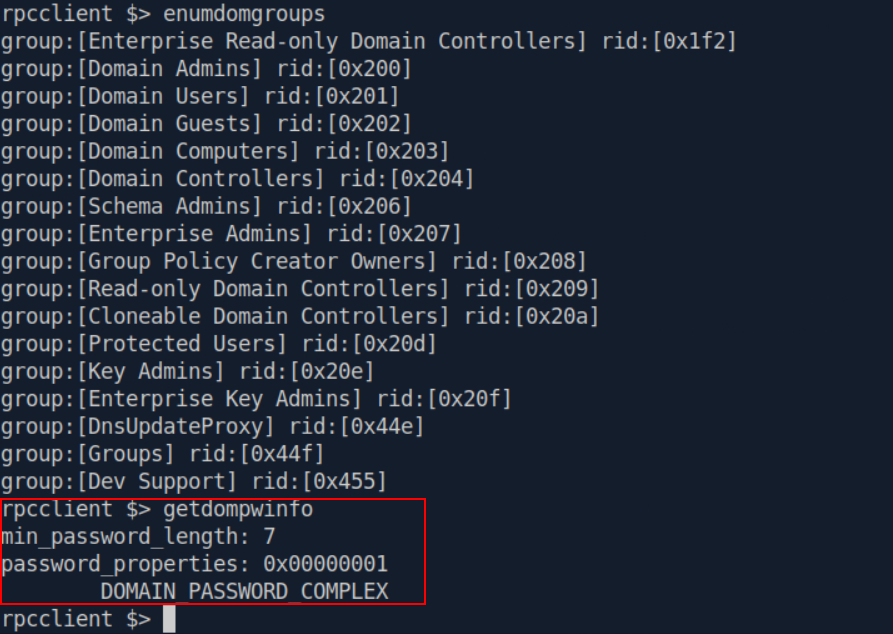
Samba defines this operation as retrieving domain password information. Depending upon what is returned, password-policy knowledge can help a penetration tester understand whether subsequent authentication testing can be performed safely. This is important, Before any password spraying exercise, you should understand the organization’s lockout configuration and agreed rules of engagement. Blind password spraying without understanding lockout controls is a good way to lock out legitimate corporate users.
Testcase 9: Look for Domain Trust Information
Another useful command is enumtrust
Samba documents this LSARPC operation for enumerating trusted domains. Trust relationships are highly relevant in large Active Directory environments. An organization might have:
- CORP.LOCAL
- DEV.CORP.LOCAL
- EUROPE.LOCAL
- LEGACY.LOCAL
Discovering another trusted domain does not automatically provide access to it. However, it expands the attack surface that should be evaluated during an authorized assessment.
Testcase 10: Enumerate Server and Share Information
RPC can also provide useful host-level reconnaissance. Try srvinfo followed by netshareenumall.
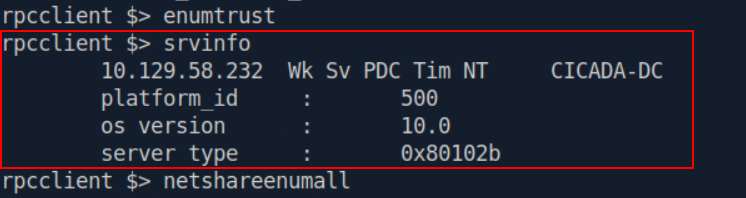
The latter asks the Server Service RPC interface to enumerate available shares. Both operations are supported by rpcclient. A result could reveal:
- ADMIN$
- C$
- IPC$
- NETLOGON
- SYSVOL
- Development
- Backup
- IT
Custom shares deserve attention. For example:
- Development
- Backup
- Scripts
- Deploy
- Software
- IT
- Users
- Public
A penetration tester can then independently test whether the current identity has access to those shares.
Useful rpcclient Commands for AD Enumeration
lsaquery – Obtain LSA/domain policy informationenumdomains – Enumerate available domainsquerydominfo – Query domain informationenumdomusers – Enumerate domain usersquerydispinfo – Retrieve account display informationqueryuser – Query a specific userenumdomgroups – Enumerate domain groupsquerygroup – Query a specific groupquerygroupmem – Enumerate group membershipgetdompwinfo – Retrieve domain password informationenumtrust – Enumerate trusted domainssrvinfo – Query server informationnetshareenumall – Enumerate server shareslookupnames – Convert account names to SIDslookupsids – Resolve SIDs to names
These capabilities are documented across Samba’s SAMR, LSARPC, and SRVSVC rpcclient commands. Instead of entering every command manually, rpcclient can execute multiple commands from the command line.
rpcclient -U "" -N <TARGET_IP> -c
'lsaquery;enumdomains;querydominfo;enumdomusers;querydispinfo;
enumdomgroups;getdompwinfo;enumtrust;srvinfo;netshareenumall'
Anonymous vs Authenticated RPC Enumeration
If anonymous access fails, that does not mean RPC enumeration is finished. During an assumed-breach assessment or after obtaining legitimate test credentials, authenticate using:
rpcclient -U 'DOMAIN/testuser' <TARGET_IP>Enter the password when prompted. Then repeat the same set of commands and compare the results. This is a useful demonstration because many organizations focus heavily on preventing unauthenticated enumeration but underestimate what a compromised standard domain account can learn.
RPC Enumeration vs LDAP Enumeration
RPC should not replace LDAP enumeration. The two techniques complement each other. LDAP is particularly powerful when querying Active Directory directory objects and their attributes. RPC provides access to Windows-specific interfaces such as SAMR, LSARPC, and SRVSVC. A good internal Active Directory assessment therefore does not rely on a single enumeration protocol. This is particularly valuable when one protocol is restricted while another still exposes useful information.
RPC enumeration is a good example of why Active Directory reconnaissance should never depend on a single tool or protocol. A penetration tester may begin with nothing more than an IP address and discover that RPC or SMB is accessible. A few carefully selected SAMR, LSARPC, and SRVSVC queries can then reveal users, groups, domain identifiers, password information, trusts, server details, and shared resources.
Tools such as BloodHound are incredibly powerful, but understanding lower-level enumeration techniques such as rpcclient makes it easier to understand where that information actually comes from and why Windows exposes it.