Content Delivery Networks (CDNs) have become a standard component of modern web applications. Whether it is a small startup application or a large enterprise platform, chances are that traffic is passing through a CDN before reaching the origin server. From a business perspective, CDNs improve performance, reduce latency, and help absorb large volumes of traffic. From a security perspective, they provide additional protection through caching, traffic filtering, DDoS mitigation, and sometimes Web Application Firewall (WAF) capabilities.
However, many organizations mistakenly assume that placing an application behind a CDN automatically secures it. In reality, CDN deployments often introduce new attack surfaces, misconfigurations, and blind spots that can be overlooked during Vulnerability Assessment and Penetration Testing (VAPT) engagements. As pentesters, our goal is not simply to identify the presence of a CDN. We need to understand how the CDN is configured, whether the origin infrastructure is exposed, whether caching mechanisms can be abused, and whether security controls can be bypassed.
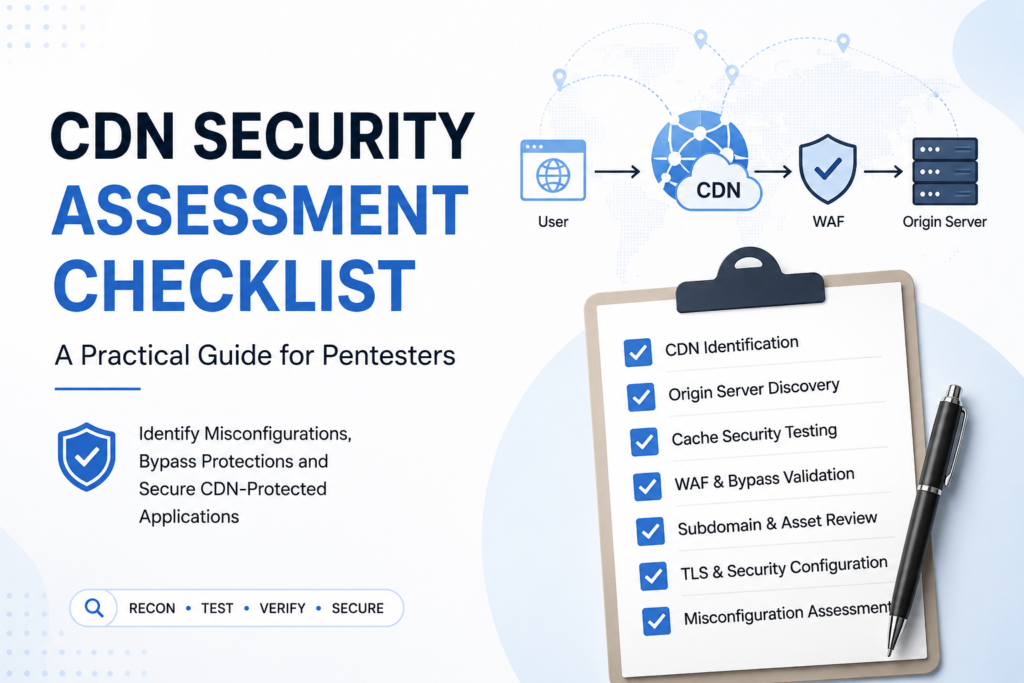
This article provides a practical CDN security assessment checklist that can be used during web application pentesting and red team engagements.
CDN Architecture Overview
Before testing anything, it helps to picture where the CDN sits and what each hop is responsible for. A typical request travels through several distinct layers before a response comes back the other way.
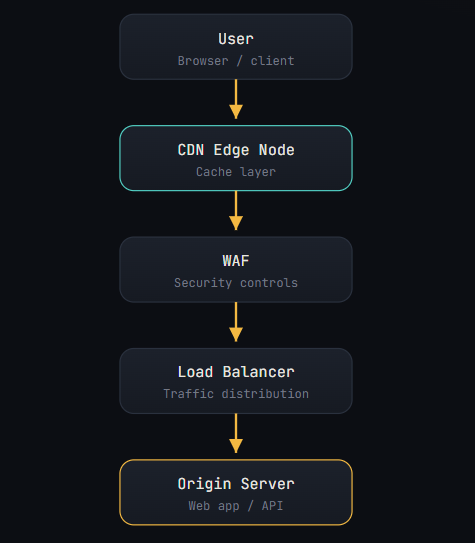
When a user loads the site, the request lands on a CDN edge node first. If the content is cacheable and already stored, it returns immediately. Dynamic requests are proxied through to the origin, and the response makes the return trip through the same chain. Every one of those hops is a place where assumptions can break, and that is exactly where we focus.
Testcase 1 : Identification of CDN
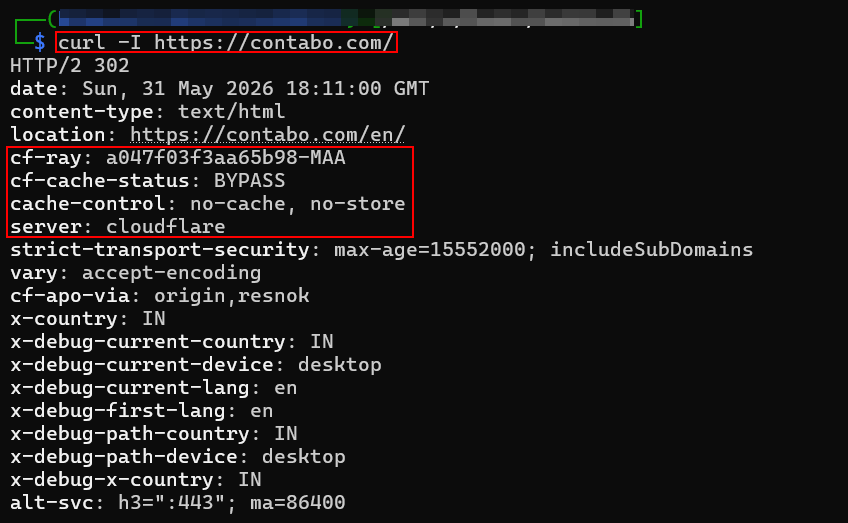
Start by confirming whether a CDN is in play and which provider it is. The fastest signal lives in the HTTP response headers, different vendors leave different fingerprints.
a. Response Headers: Cloudflare gives itself away with cf-ray and cf-cache-status as response headers; CloudFront uses x-amz-cf-id; generic edges expose via and x-cache.
b. DNS Analysis: DNS records are the second confirmation. A dig against the apex or www host often resolves to a provider-owned hostname.
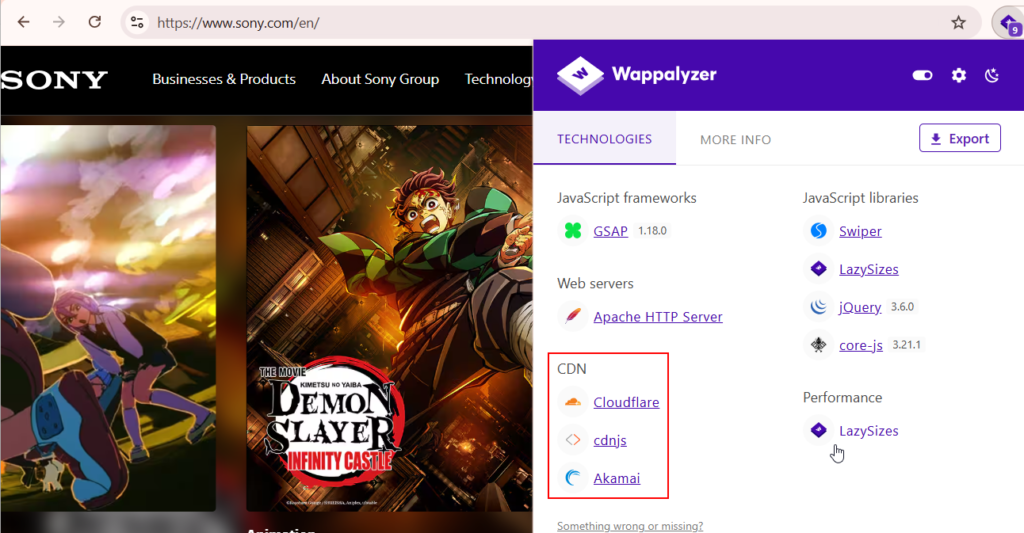
c. Extension/Tools – Technology Fingerprinting: Using extensions and tools like Wappalyzer, BuiltWith, Securitytrails etc. usage of CDN can also be identified or enumerated.
Testcase 2 : Hunting Origin Server
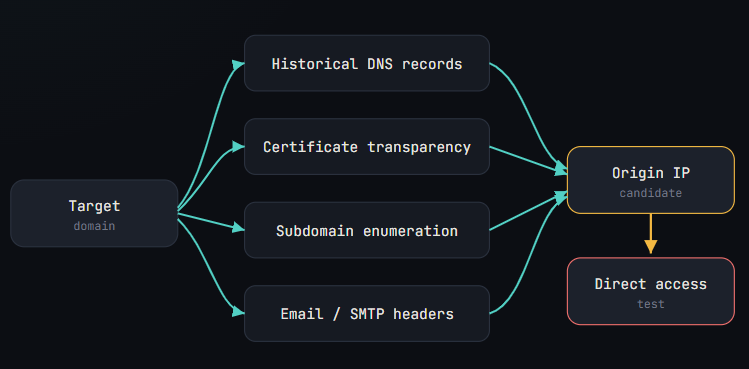
This is the phase that turns a routine review into a real finding. If the origin can be reached directly, every edge-side protection, the WAF, rate limiting, bot filtering, simply does not apply to an attacker who knows where to knock. The discovery process is a funnel: gather candidate addresses from several independent sources, then test them.
Testcase 3 : Validating Origin Access Controls
Finding the origin is only half the work. A well-configured origin will reject any traffic that did not come through the CDN, typically by allow-listing the provider’s IP ranges or requiring a shared secret header. So test whether that lockdown actually exists. Hit the origin directly over both “http://” and “https://” and watch what comes back, a login page, an application error, or a full working app each tell a different story. Then compare the two responses side by side.
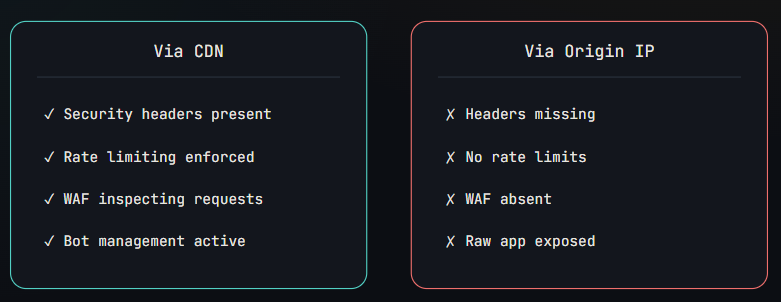
Confirm rate limiting empirically, fire a burst of requests through the CDN and the same burst against the origin. If Burp Intruder gets throttled or challenged on the CDN path but sails through unimpeded against the origin, you have a concrete, demonstrable gap to report.
Testcase 4 : Cache Security Testing
Caching is one of the richest, and most overlooked, attack surfaces a CDN introduces. Begin by mapping what is actually being cached. The cf-cache-status, x-cache, and age headers tell you the state of each response.
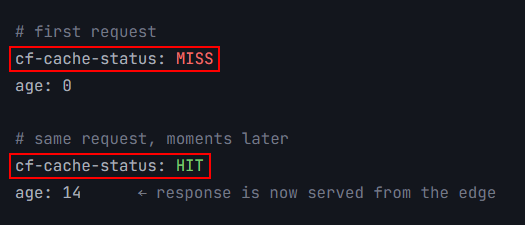
The danger arrives when authenticated content gets cached. If a user profile, dashboard, account page, or personalized API response lands in a shared cache, the next person to request that path may receive someone else’s data. That is the failure mode in its simplest form.

Cache keys deserve their own attention. The key determines which requests are treated as “the same” for caching purposes. Probe how the edge handles Host, Cookie, User-Agent, and X-Forwarded-Host, if changing a header you control alters the cached response, that behavior is the seed of the next two attacks.
Testcase 5 : Cache Poisoning
Cache poisoning happens when an attacker manipulates a request so the malicious response gets stored at the edge and then served to everyone who follows. The usual vector is an unkeyed input, a header the application reflects but the CDN does not include in its cache key.
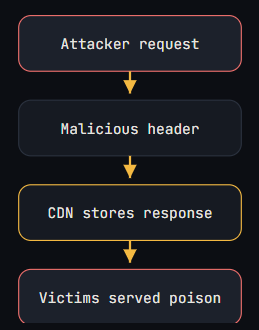
The headers to test are the usual suspects: X-Forwarded-Host, X-Host, and Forwarded. Watch for three things, whether the value is reflected into the response, whether it influences a redirect, and crucially whether the manipulated response then gets cached.
Testcase 6 : Cache Deception
Cache deception flips the logic of poisoning. Instead of injecting content, the attacker tricks the CDN into caching a victim’s private response by disguising the request as a static asset. A request to a path such as /profile/account.css may return the user’s real profile data from the application, while the CDN, seeing a .css extension, happily caches it as a public file.
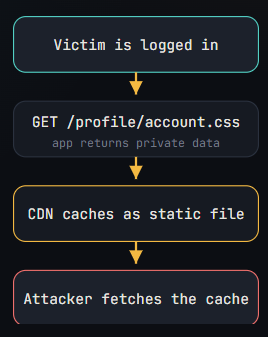
To demonstrate it, capture the authenticated response served on the deceptive path, then re-request the same URL from a clean session and confirm a cache HIT returning the victim’s data. That sequence, private content in, cache hit out, is the whole vulnerability.
Testcase 7 : WAF & Control Validation
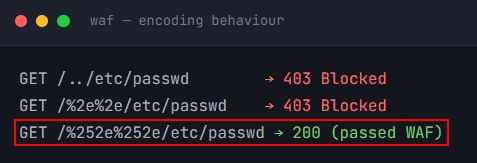
Most CDN deployments bundle a WAF, and most WAFs can be coaxed into letting a payload through. The two reliable angles are encoding tricks and parser confusion, where the WAF and the origin disagree about what a request actually says.
a. Double Encoding Check: Compare how the stack treats progressively encoded traversal sequences. A raw “../” may be blocked while a double-encoded “%252e%252e/” slips past the filter but still resolves at the origin.
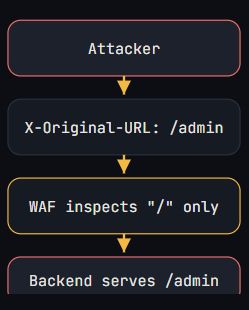
b. Host Header Routing Check: Header-based routing tricks are the second avenue. Some back ends honor X-Original-URL or X-Rewrite-URL to set the effective path after the WAF has already inspected the original request line, and X-Forwarded-For spoofing can defeat IP-based rules.
CDNs provide valuable security and performance benefits, but they should never be treated as a replacement for secure application design and proper infrastructure hardening.
During VAPT engagements, security assessors should look beyond the presence of a CDN and focus on how it is configured. Exposed origin servers, insecure caching behaviour, cache poisoning opportunities, inconsistent protection across subdomains, and WAF bypasses remain common findings in real-world environments.
A structured CDN assessment methodology helps identify these weaknesses early and provides organizations with actionable recommendations to strengthen their security posture. The next time you encounter a CDN-protected application during an assessment, remember that the CDN itself may become an important part of the attack surface.